
What is Unity Catalog in Databricks? Unity Catalog is the unified governance layer for data and AI assets in Databricks. It gives you one place to define who can access tables, files, volumes, models and functions, to see lineage between them, to audit usage and to share data safely across workspaces and with other organisations. This guide explains the three level namespace, how metastores, catalogs and schemas relate, how permissions and inheritance work, how to use row filters and column masks, how lineage and audit help and how to roll it out in an existing environment. Features change, so confirm details in current Databricks documentation.
Short answer: Unity Catalog centralises governance in Databricks. Organise data as catalog, schema and table, grant privileges to groups, apply masks and filters to sensitive data, use lineage and audit for oversight and share data securely with Delta Sharing.
What is Unity Catalog?
Before a central catalog, each workspace often had its own permissions and metadata, so the same table could be governed differently in different places. Unity Catalog moves governance to the account level. A single metastore per region holds the metadata, and many workspaces attach to it, so one set of rules applies everywhere. It is the governance core of the Databricks lakehouse and supports the controls described in data governance.
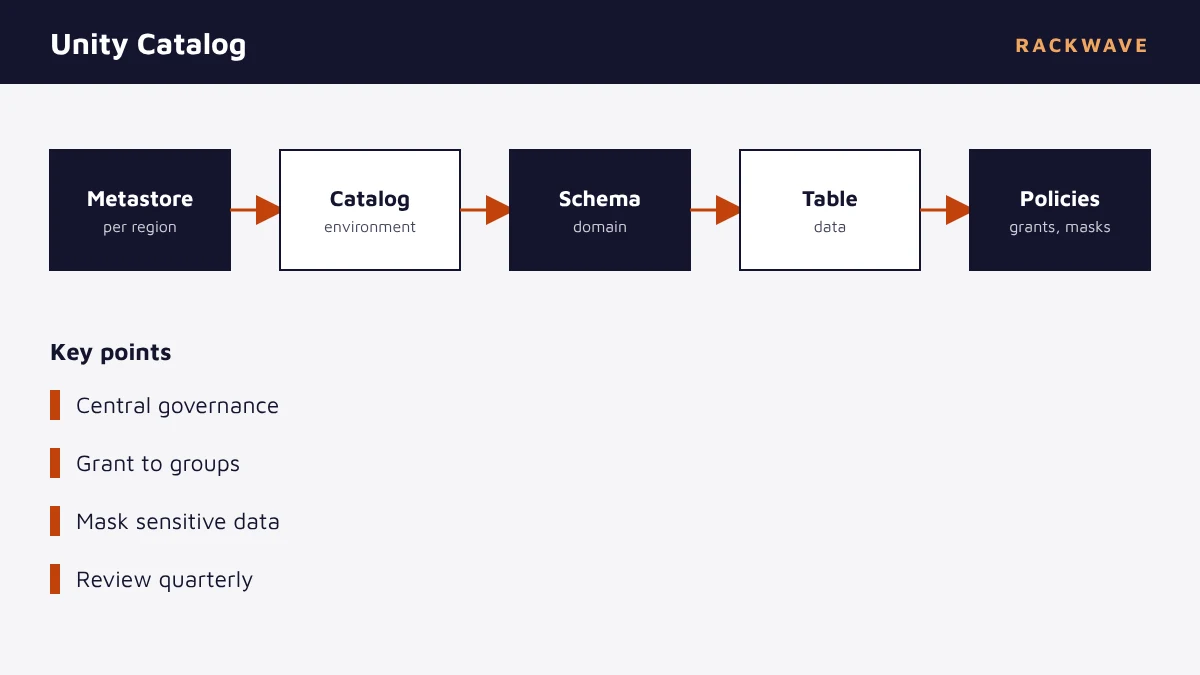
The object model
| Level | Meaning | Example |
|---|---|---|
| Metastore | Top-level container for a region, shared by workspaces | One per cloud region |
| Catalog | First level of the namespace, often per environment or domain | prod_sales |
| Schema | Groups tables, views, volumes, functions and models | orders |
| Table or view | The data objects people query | prod_sales.orders.invoices |
| Volume | Governed storage for non-tabular files | Documents, images, raw files |
| Registered model and function | Governed ML models and SQL or Python functions | fraud_model |
Every object is referred to by its three-part name, which makes lineage and permissions consistent.
Permissions and inheritance
- Privileges such as USE CATALOG, USE SCHEMA and SELECT are granted to users, service principals or groups.
- Grants on a catalog or schema are inherited by the objects inside, so you can grant once at the right level.
- Prefer granting to groups synced from your identity provider, not to individuals. See single sign-on.
- Ownership lets a principal manage an object and grant access, so assign it to groups.
- Separate production and development catalogs and restrict write access to production.
Plan the hierarchy first. Moving objects between catalogs later is possible but disruptive.
Protecting sensitive data
Table level grants do not stop a permitted user from seeing a column they should not. Use column masks to return masked values for most users and the real value for approved groups, and row filters to limit which rows each group sees. Use tags to classify columns such as personal data so policies and reports can find them. These controls support obligations under laws such as GDPR.
Lineage, audit and discovery
- Lineage shows upstream and downstream tables, notebooks, jobs and dashboards for a table, down to column level where supported.
- Audit logs and system tables record who accessed what and when, which helps investigations and access reviews.
- Catalog search and comments help users find and understand data. See data catalogs and data lineage.
- Certification tags can mark trusted tables so users know what to use.
Sharing data with Delta Sharing
Delta Sharing is an open protocol for sharing live data without copying it, supported by Unity Catalog. A provider creates a share containing tables, defines recipients and the recipient reads the data with Databricks or other tools that support the protocol. It suits partner data exchange and internal sharing across business units, and it has its own governance and cost considerations, so keep a register of shares and owners. Compare with approaches such as Snowflake data sharing.
How to roll out Unity Catalog
- Plan the hierarchy. Decide the catalogs, schemas and naming by environment and domain.
- Set up identity. Sync users and groups from your identity provider.
- Create the metastore and attach workspaces. One per region, attached to each workspace that should use it.
- Define storage access. Create storage credentials and external locations for cloud storage.
- Migrate or register tables. Upgrade existing tables and register external data.
- Apply policies. Grant by group, add masks and filters and set tags.
- Monitor. Review lineage, audit data and quarterly access.
Metrics and reviews
| Measure | Why it matters | Target idea |
|---|---|---|
| Share of tables registered in the catalog | Shows coverage of governance | Close to all production tables |
| Tables with an owner group | Shows accountability | All certified tables |
| Sensitive columns tagged and masked | Shows protection coverage | All known personal data |
| Access requests resolved by group change | Shows process maturity | Most requests |
| Quarterly access reviews completed | Shows oversight | Every domain each quarter |
Share these figures with data owners and security each quarter. The point is not the number itself but a visible habit of review, which is what auditors and regulators look for.
Migrating from the legacy metastore
- Inventory current tables, external locations, permissions and the notebooks and jobs that use them.
- Upgrade managed and external tables in groups, starting with low-risk domains, and test queries after each group.
- Rewrite references to two-part names where needed, and update jobs and dashboards to the new three-part names.
- Run old and new side by side briefly, then retire legacy grants to avoid two sources of truth.
- Communicate dates and support routes to users well in advance.
Working with identity and service principals
Automated pipelines and applications should connect as service principals with narrowly scoped privileges, never as personal accounts. Create one principal per application or pipeline family, grant it the catalogs and schemas it needs, and record the owner. When someone leaves, their personal access ends through your identity provider while pipelines continue to run. This separation is one of the simplest ways to make audit logs readable and to limit the damage of a leaked credential.
Common mistakes
- Granting to individuals and creating an unmanageable list of exceptions.
- Giving broad privileges on the metastore or on storage locations.
- Leaving a mix of legacy and Unity Catalog tables with different rules for months.
- No owner groups, so nobody can approve access.
- Treating masks as an afterthought until an audit.
A worked example
A bank had five workspaces, each with its own permissions. It moved to one Unity Catalog metastore per region, created catalogs per environment and schemas per domain and mapped identity provider groups to privileges. Customer identifiers were tagged and masked for everyone except a small risk team. Lineage then showed which dashboards used a table before a schema change.
Access reviews, which used to take weeks of spreadsheets, became a report from audit data. The example is illustrative.
Best practices
- Name catalogs by environment and domain in a consistent way and document the convention.
- Use groups for every grant and require an owner group on every schema.
- Automate grants and objects with infrastructure as code so environments match. See infrastructure as code.
- Review system tables for unusual access and unused objects each quarter.
- Start with the most sensitive data and expand coverage in phases.
Support
Our data governance service designs Unity Catalog hierarchies, policies and review processes, and our data analytics service builds governed lakehouse models. For storage design see Delta Lake.
Key takeaways
- Unity Catalog centralises governance across workspaces.
- Use catalog, schema and object names to organise data.
- Grant to groups and inherit permissions from the right level.
- Apply masks, filters and tags to sensitive data.
- Use lineage and audit data for oversight and reviews.
Quick glossary
| Term | Meaning |
|---|---|
| Metastore | Regional container for Unity Catalog metadata |
| Catalog | Top level of the three-part namespace |
| Column mask | Rule that hides or transforms column values |
| Row filter | Rule that limits visible rows |
| Delta Sharing | Open protocol for sharing live data |
Read next: BigQuery vs Snowflake: Which Cloud Data Platform? · BigQuery Streaming Inserts: Real-Time Ingestion Guide · BigQuery Access Control: IAM, Policy Tags and Row Security
Frequently asked questions
What is Unity Catalog?
It is the unified governance layer for data and AI assets in Databricks, covering permissions, lineage, audit and discovery.
What is the three level namespace?
Objects are named catalog.schema.object, which keeps permissions and lineage consistent.
How do permissions work?
Privileges are granted to groups or principals on objects and inherited by objects below them.
Can I mask columns?
Yes, with column masks, and you can limit rows with row filters.
What is a metastore?
The top-level container for metadata in a region, shared by attached workspaces.
What is Delta Sharing?
An open protocol for sharing live data with other organisations or teams without copying it.
Does Unity Catalog show lineage?
Yes, it records lineage between tables, jobs, notebooks and dashboards, including column level where supported.
Do I need Unity Catalog for a small team?
It is still useful because governance is easier to set up early than to retrofit later.