
What is Snowflake data sharing? Snowflake data sharing lets one account give another account live, read-only access to selected data without copying or moving it. The provider controls exactly which objects are shared, and the consumer queries them with its own compute. This guide explains how secure data sharing works, the difference between shares, reader accounts and listings, how to share across regions and clouds, how to protect sensitive columns and how to govern what you publish. Features change, so confirm details in current Snowflake documentation.
Short answer: Snowflake data sharing grants live, read-only access to chosen tables and secure views through a share. There is no copy and no pipeline. Use secure views to limit what consumers see, and use replication for other regions or clouds.
What is data sharing in Snowflake?
In a traditional integration, sharing data means exporting files, building an API or maintaining a pipeline, and each consumer ends up with its own stale copy. In Snowflake, a provider creates a share that points to its data. A consumer creates a database from that share and queries it immediately. The data stays in the provider account, so consumers always see current values and storage is not duplicated.
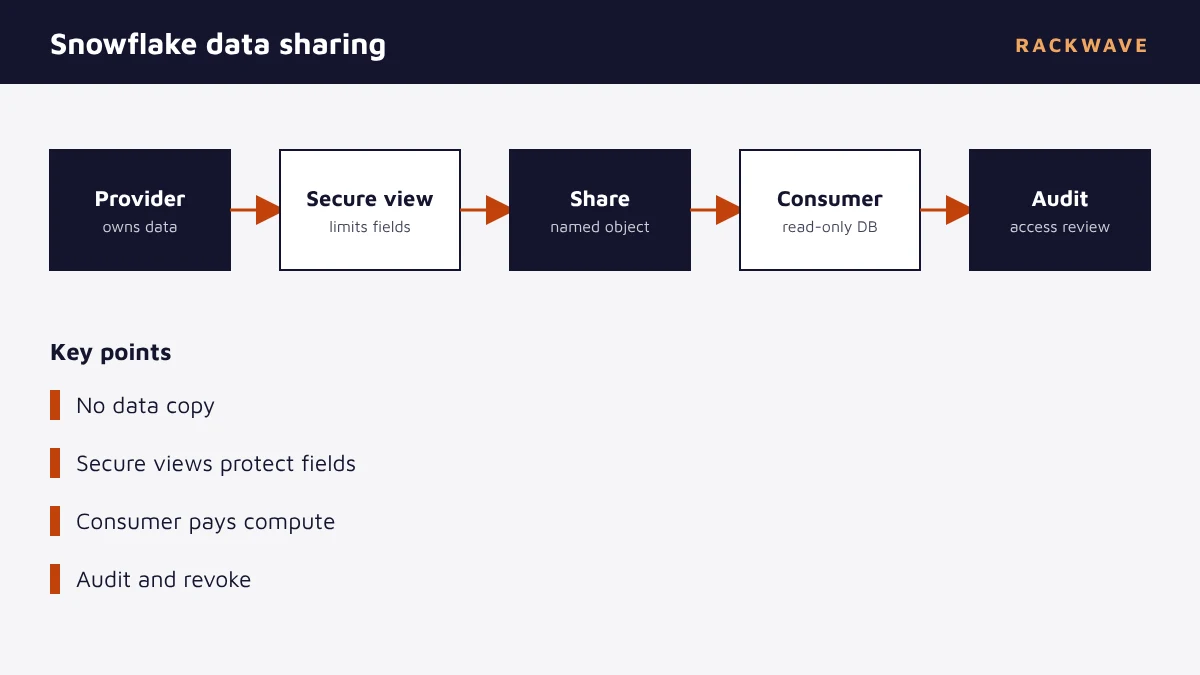
Key concepts
| Concept | Meaning |
|---|---|
| Provider | The account that owns the data and creates the share |
| Consumer | An account that mounts the share as a read-only database |
| Share | A named object listing the databases, schemas and objects exposed |
| Secure view | A view that hides its definition and can filter rows or mask columns per consumer |
| Reader account | A Snowflake account the provider creates and pays for, for partners who do not have Snowflake |
| Listing | A packaged data product offered privately or on a marketplace |
Consumers pay for the compute they use to query shared data. Providers pay for storage.
How secure data sharing works
- Choose what to share. Select tables or secure views that expose only the fields consumers need.
- Create the share. Add the database, schema and objects to a share and grant usage.
- Add consumer accounts. Name the accounts allowed to access it.
- Consumer mounts the share. The consumer creates a read-only database from the share.
- Control and audit. Review access, change the share and revoke when the agreement ends.
Sharing with partners who do not use Snowflake
A provider can create reader accounts for partners without their own Snowflake account. The reader account queries shared data using compute billed to the provider, so set resource monitors and agree usage limits. For larger partnerships, asking the partner to open its own account is usually cleaner.
Sharing across regions and clouds
Direct shares work between accounts in the same region and cloud. To share elsewhere, replicate the data to an account in the target region or cloud and share from there. Replication adds storage and transfer cost and some delay, so decide which data really needs to travel. Listings and cross-cloud features can simplify distribution, but confirm availability for your setup.
Protecting sensitive data
- Share secure views, not base tables, so consumers cannot see definitions or unshared columns.
- Use row access policies and masking policies so each consumer sees only what they are entitled to.
- Remove direct identifiers or tokenise them where the use case allows. See data governance for policy design.
- Keep a register of shares, owners and purposes.
- Review consumers regularly and revoke access that is no longer needed.
Common use cases
| Use case | Example |
|---|---|
| Partner data exchange | A retailer shares sales data with a supplier |
| Internal domain sharing | Finance shares curated data with marketing without copying |
| Data products | A company publishes a governed dataset to customers |
| Third party enrichment | A provider shares reference data that consumers join to their own |
Internal sharing between business units fits well with data products and data mesh ideas, where each domain owns and publishes its own data.
Listings and marketplace distribution
A listing packages shared data as a product with a title, description, sample queries and terms. A listing can be private, offered to named accounts, or published for broader discovery. Listings are useful when you have many consumers because they standardise onboarding and let consumers request access without a manual process. Good listings document the data dictionary, refresh schedule, known limitations and a contact. Treat the listing as the public contract of a data product.
Sharing compared with other methods
| Method | Copy made | Freshness | Effort | Control |
|---|---|---|---|---|
| Snowflake data sharing | No | Live | Low for Snowflake consumers | Fine grained, revocable |
| File export to storage | Yes | As of export | Medium and recurring | Limited once delivered |
| API | No, but queried on demand | Live | High to build and secure | Strong, per call |
| Database replication or ETL | Yes | Scheduled | High | Depends on target |
Sharing wins when both sides use Snowflake and need current data. APIs remain better for transactional access, and file exports still suit systems that cannot connect directly. See APIs for when a service interface is more appropriate.
Reviewing a sharing request
- Identify the business owner and the purpose of the sharing.
- List the exact objects and columns needed, and refuse broader access by default.
- Check privacy, contractual and regulatory restrictions, including cross-border transfer.
- Decide the delivery model: direct share, reader account, replication or listing.
- Set an expiry or review date and a named contact on both sides.
Measuring the value of sharing
Track the number of active consumers, queries per consumer, the share of consumers who stay active after ninety days and the support requests avoided compared with file delivery. For external data products, also track revenue or partner satisfaction. Review unused shares each quarter and retire them, because every active share is an access path that needs to be governed, documented and owned by a named person.
Common mistakes
- Sharing base tables directly and exposing columns that should stay private.
- Forgetting that consumers pay compute, then being surprised by reader account costs.
- Sharing without a documented owner, purpose and review date.
- Treating a share as a backup or archive.
- Ignoring replication cost when sharing to other regions.
A worked example
A consumer goods company shares daily sell-through data with twelve retail partners. Instead of exporting files, it creates secure views filtered by partner and a share per partner group. A row access policy ties each view to the partner account, and a masking policy hides margin fields. Partners query live data with their own Snowflake accounts, and two smaller partners use reader accounts with monitors.
File exports and support calls dropped because partners could answer their own questions, and the data team gained a single place to audit access. Results are illustrative.
Governance and support
Treat each share as a published interface. Document the schema, refresh behaviour and contact, change it carefully and give consumers notice. Pair sharing with role-based access control inside the provider account. Our data governance service designs sharing models and policies, and our data warehousing service builds the underlying platform.
Key takeaways
- Data sharing gives live, read-only access without copying data.
- Share secure views and apply masking and row policies.
- Consumers pay compute and providers pay storage.
- Use replication to reach other regions or clouds.
- Keep a register of shares, owners and review dates.
Quick glossary
| Term | Meaning |
|---|---|
| Share | A Snowflake object that exposes selected data to other accounts |
| Provider | The account that owns and shares data |
| Consumer | An account that queries shared data |
| Reader account | A provider-managed account for partners without Snowflake |
| Secure view | A view that protects its definition and limits visible data |
Read next: BigQuery vs Snowflake: Which Cloud Data Platform? · BigQuery Streaming Inserts: Real-Time Ingestion Guide · BigQuery Access Control: IAM, Policy Tags and Row Security
Frequently asked questions
What is Snowflake data sharing?
It lets a provider give another account live, read-only access to selected data without copying or moving it.
Does data sharing copy data?
No. Consumers query the provider data through a share, so there is no duplicate storage or pipeline.
Who pays for queries on shared data?
The consumer pays for its own compute, and the provider pays for storage. Reader accounts are billed to the provider.
What is a reader account?
It is an account a provider creates for partners without Snowflake so they can query shared data.
Can I share across regions?
Yes, by replicating data to an account in the target region or cloud and sharing from there.
How do I hide sensitive columns?
Share secure views and use row access and masking policies so consumers only see permitted data.
Can consumers change shared data?
No. Shared databases are read-only for consumers.
How do I stop sharing?
Remove the consumer from the share or drop the share, and access ends for that account.