
What is OpenID Connect? OpenID Connect, or OIDC, is an identity layer built on top of the OAuth 2.0 protocol that lets applications verify who a user is and obtain basic profile information from an identity provider. While OAuth 2.0 handles delegated authorisation, giving an app limited access to resources, OIDC adds authentication through a signed ID token in JSON Web Token format. It is the standard way to implement sign in with a company or social account in modern web, mobile and single page applications, and it powers many single sign-on deployments. This guide explains how OIDC works, its tokens and flows, how it compares with OAuth and SAML, security best practices and a step by step implementation approach.
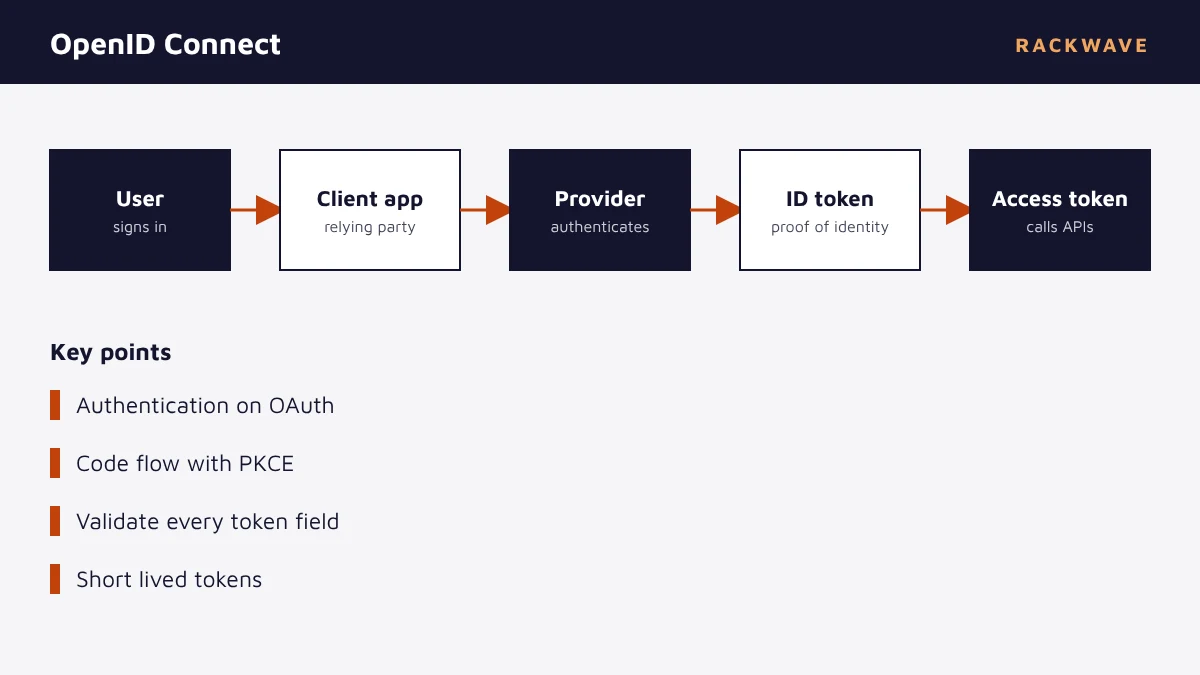
Short answer: OpenID Connect adds authentication to OAuth 2.0. After the user signs in at an identity provider, the application receives an ID token that proves who the user is, plus access tokens for APIs.
What is OpenID Connect?
The OpenID Connect article on Wikipedia describes it as an authentication layer over OAuth 2.0. It extends OAuth, is an alternative to SAML for single sign-on and underpins secure API security for mobile and web clients.
Key OIDC concepts and tokens
| Concept | Meaning |
|---|---|
| Relying party (client) | The application that wants to authenticate the user |
| OpenID provider (IdP) | The service that authenticates the user and issues tokens |
| ID token | A signed JWT containing claims about the authentication and the user |
| Access token | A credential for calling protected APIs |
| Refresh token | A long lived credential to obtain new access tokens |
| Scopes | Requested permissions, such as openid, profile and email |
| Claims | Pieces of information about the user, such as subject and email |
| UserInfo endpoint | API returning more profile claims |
| Discovery document | A well known URL listing endpoints and keys |
How the authorisation code flow works
- The client redirects the user to the IdP authorisation endpoint with scope openid, a state value and a PKCE code challenge.
- The user authenticates, using MFA if required, and consents if needed.
- The IdP redirects back with a short lived authorisation code.
- The client exchanges the code, with the PKCE verifier, at the token endpoint.
- The IdP returns an ID token, an access token and optionally a refresh token.
- The client validates the ID token signature, issuer, audience, nonce and expiry, then creates a session.
OIDC compared with OAuth 2.0 and SAML
| Item | OAuth 2.0 | OpenID Connect | SAML 2.0 |
|---|---|---|---|
| Purpose | Delegated authorisation | Authentication on top of OAuth | Enterprise federated authentication |
| Token format | Opaque or JWT access tokens | JWT ID token plus access token | XML assertion |
| Best for | API access | Web, mobile, SPA sign in | Legacy and enterprise web apps |
| Complexity | Moderate | Moderate | Higher, XML heavy |
| Mobile and API friendly | Yes | Yes | Less so |
Common OIDC flows
| Flow | Use | Notes |
|---|---|---|
| Authorisation code with PKCE | Web, mobile and single page apps | Recommended default |
| Client credentials | Machine to machine access | No user, so no ID token |
| Device authorisation | TVs and devices without browsers | User approves on another device |
| Implicit and hybrid | Older patterns | Avoid implicit in new designs |
| Refresh token | Renewing sessions | Protect, rotate and bind where possible |
Security best practices
- Use the authorisation code flow with PKCE for every public client.
- Validate the ID token fully: signature, issuer, audience, expiry and nonce.
- Use exact redirect URI matching and the state parameter against CSRF.
- Keep tokens short lived, rotate refresh tokens and store them securely.
- Do not use ID tokens to call APIs, and do not trust access tokens in the browser for sensitive data.
- Rotate signing keys and fetch them through the discovery document.
How to implement OpenID Connect
- Choose an identity provider. Use an enterprise IdP or customer identity platform with OIDC support and a certified library.
- Register the application. Create a client, set redirect URIs and select scopes.
- Implement the code flow with PKCE. Use a well maintained library rather than custom token handling.
- Validate tokens and map claims. Check all token fields and map claims to roles and permissions in the app.
- Secure sessions and APIs. Use secure cookies or backend for frontend patterns and validate access tokens at APIs.
- Handle logout and refresh. Implement session timeout, refresh rotation and sign out across applications.
- Test and monitor. Run security tests, log failures and watch for unusual patterns.
Our API development service builds secure OIDC enabled applications and APIs, and our system integration service connects them to your identity provider.
A worked example: sign in for a customer portal
A B2B portal wants customers to sign in with their own corporate accounts and also offers email sign in for smaller clients. The team integrates an OIDC capable identity platform, using the authorisation code flow with PKCE from a single page app through a thin backend. The ID token supplies the subject, email and organisation claim, which the portal maps to a tenant and a role.
APIs accept short lived access tokens and check audience and scopes on every call. Refresh tokens rotate on use, and a central dashboard shows sign in failures by tenant. When a large customer asks for single sign-on with its own provider, the team adds that IdP as a federated connection in hours rather than weeks.
Claims, scopes and authorisation design
OIDC proves who the user is, but your application still decides what they may do. Keep identity claims small and stable, such as subject, email and organisation, and map them to roles inside your own system or through a central authorisation service. Request only the scopes you need, avoid putting sensitive data in tokens that travel through browsers and design APIs to check scopes, audience and tenant on every request rather than trusting the front end.
Common mistakes and troubleshooting
Frequent problems include mismatched redirect URIs, clock skew that makes tokens appear expired, validating only the signature and not the audience, confusing ID tokens with access tokens and using the deprecated implicit flow. Use the discovery document to avoid hard coded endpoints, log the reason for each token validation failure and test with a tool that decodes tokens, so issues are visible quickly. A short checklist reviewed at every integration prevents most security defects.
OIDC in microservice and API environments
In larger estates, tokens flow through gateways and services. An API gateway can validate access tokens centrally and pass trusted identity context to microservices, which then enforce fine grained permissions. This keeps token validation consistent and reduces the chance that one service skips a check. Combine it with API management policies for quotas and logging, and keep service to service calls on short lived machine credentials instead of reusing user tokens.
Plan for token lifetime and revocation. Short access tokens limit damage if one leaks, while refresh token rotation and session revocation endpoints let you cut off compromised sessions. Document which services accept which audiences and scopes, so new teams integrate correctly from day one.
Key takeaways
- OpenID Connect adds authentication to OAuth 2.0 using a signed ID token.
- Use the authorisation code flow with PKCE for web, mobile and single page apps.
- Validate ID tokens fully and keep tokens short lived and protected.
- OIDC is simpler and more API friendly than SAML, which still dominates legacy enterprise apps.
- Use certified libraries and design authorisation separately from authentication.
Quick glossary
| Term | Meaning |
|---|---|
| ID token | A JWT proving who authenticated |
| Access token | A credential for APIs |
| PKCE | Proof key protecting the authorisation code flow |
| Claim | A piece of information about the user |
| Discovery document | A published list of OIDC endpoints and keys |
Read next: What Is API Management? Lifecycle, Features, Tools · What Is a Message Queue? Patterns and Best Practices · What Is RabbitMQ? Exchanges, Queues and Use Cases
Frequently asked questions
What is OpenID Connect in simple terms?
It is a standard way for an application to confirm who a user is by relying on an identity provider, built on top of OAuth 2.0.
What is the difference between OAuth 2.0 and OpenID Connect?
OAuth 2.0 grants access to resources. OpenID Connect adds authentication, returning an ID token that identifies the user.
What is an ID token?
It is a signed JSON Web Token containing claims about the authentication event and the user, intended for the client application.
Which OIDC flow should I use?
Use the authorisation code flow with PKCE for web, mobile and single page applications. Avoid the implicit flow.
Is OpenID Connect better than SAML?
OIDC is lighter and better for modern apps and APIs, while SAML remains common in established enterprise applications. Many organisations support both.
Can I use OIDC for single sign-on?
Yes. With a shared identity provider, signing in once gives access to multiple OIDC enabled applications.
What does the openid scope do?
It signals an OIDC request, so the provider returns an ID token along with any other requested tokens.
How do I secure OIDC tokens?
Validate signature, issuer, audience, expiry and nonce, use short lifetimes, rotate refresh tokens and store tokens safely.