
What is a vector database? It is a database designed to store, index and search vectors, which are lists of numbers that represent the meaning of data such as text, images, audio or products. Instead of matching exact keywords, a vector database finds the items whose vectors are closest to the vector of a query, so it can return results that are similar in meaning. Vector databases are a core component of semantic search, recommendation engines and retrieval augmented generation for AI assistants. This guide explains embeddings, how similarity search works, the main index types, how to choose a product and how to run one in production.
Short answer: A vector database stores embeddings and retrieves the nearest ones to a query vector quickly, usually using approximate nearest neighbour indexes. It lets applications search by meaning, and it is the memory layer behind many AI assistants.
What is a vector database?
Traditional databases match exact values or keywords. A vector database matches similarity. Text, images and other content are converted by an embedding model into vectors, usually with hundreds or thousands of dimensions, and items with related meaning end up close together. The vector database article on Wikipedia covers the concept. It is the retrieval engine used in retrieval augmented generation systems built on a large language model.
How a vector database works
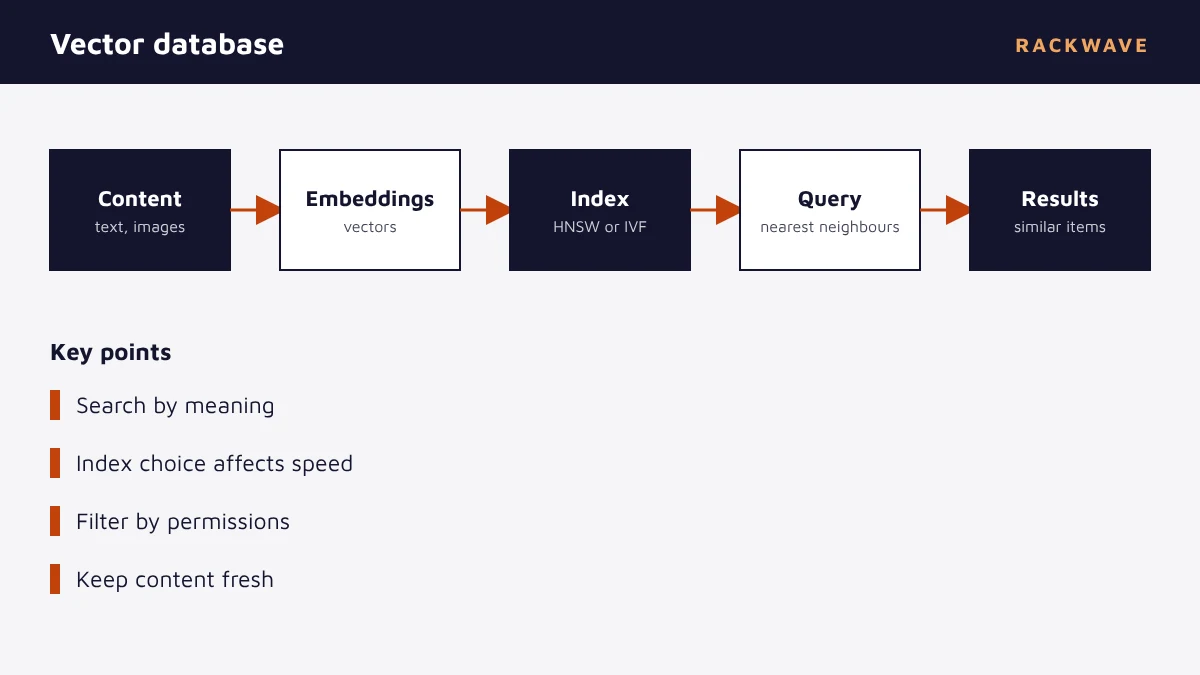
- Create embeddings. An embedding model converts each document, image or record into a vector.
- Store with metadata. Vectors are saved with fields such as source, date, owner and access level.
- Build an index. The database organises vectors so that similar ones can be found without checking all of them.
- Embed the query. The user question is converted with the same model into a query vector.
- Search for nearest neighbours. The database returns the vectors with the highest similarity, using cosine similarity, dot product or distance.
- Filter and rank. Metadata filters limit results, and an optional reranker orders them by relevance.
- Return the content. The matching items are given to the application or to an AI model.
Similarity measures and index types
| Item | Description | Notes |
|---|---|---|
| Cosine similarity | Compares the angle between vectors | Common for text |
| Dot product | Combines direction and magnitude | Used by many models |
| Euclidean distance | Straight line distance | Common for images and features |
| Flat index | Compares to every vector | Exact but slow at scale |
| HNSW | Graph based approximate search | Fast and accurate, uses more memory |
| IVF | Clusters vectors and searches nearby clusters | Good for large datasets |
| Quantisation | Compresses vectors | Saves memory with small accuracy cost |
Vector database compared with other stores
| Store | Strength | Limit |
|---|---|---|
| Relational database | Exact queries and transactions | Weak at semantic similarity |
| Keyword search engine | Exact terms and ranking | Misses meaning and synonyms |
| Vector database | Similarity by meaning | Needs embeddings and tuning |
| Hybrid search | Combines keyword and vector results | More components to run |
Many relational and search products now offer vector features, so a separate vector database is not always needed. For smaller data, an existing database with a vector extension may be enough, while large scale or very low latency needs may justify a dedicated product.
Use cases
- Semantic search across documents, wikis and tickets.
- Question answering and assistants that retrieve company knowledge.
- Product and content recommendations based on similarity.
- Duplicate detection and clustering of similar records.
- Image and audio search by example.
- Anomaly detection by finding items far from the normal cluster.
How to choose and set up a vector database
- Estimate scale. Count vectors, dimensions, growth and queries per second.
- Choose the embedding model. It decides quality, language coverage, dimensions and cost, and changing it later means re-embedding everything.
- Pick the product. Compare managed services, open source engines and vector features in your current database.
- Design metadata and permissions. Store access control fields and filter by them at query time. See data governance.
- Tune the index. Balance recall, speed and memory with your own data and test queries.
- Test quality. Check that searches return the right items on real examples and measure recall.
- Operate it. Plan backups, updates, monitoring and cost control.
Common vector database mistakes
- Choosing a product before measuring scale and latency needs.
- Chunking documents poorly, which hurts retrieval quality more than any index setting.
- Forgetting to apply permissions when searching.
- Changing embedding models without re-indexing.
- Relying only on vector search when exact keywords also matter.
- No process for deleting or updating content, which leaves stale answers.
Our AI and machine learning service designs retrieval systems with vector search, and our data governance service keeps the underlying knowledge accurate and secure.
A worked example: semantic search for a support portal
A telecom company has 12,000 support articles, and keyword search fails when customers describe problems in their own words. The team converts articles into passage embeddings and loads them into a vector index with metadata for product, language and country. Customer queries are embedded and matched against the index, and results are combined with keyword search to catch exact error codes.
Click through on the first result rises from 41 percent to 63 percent and contact centre volume for the covered topics falls. The team tuned index settings against 500 test queries, accepting a tiny loss of recall for much lower latency. They also built a nightly job to re-embed changed articles and remove retired ones, which kept the search aligned with the live knowledge base.
Costs and operations
Vector storage and search can consume a lot of memory, because fast indexes are often held in RAM. Costs grow with the number of vectors, their dimensions and the replicas needed for availability. Compression, smaller embedding models and tiered storage reduce cost. Monitor query latency, recall on a test set and index freshness, and plan for re-embedding when you upgrade models, since vectors from different models are not comparable.
Choosing chunk size and embedding model
Retrieval quality depends first on what you put in the index. Long documents should be split into passages that each hold one idea, usually a few hundred words, with a small overlap so that meaning is not cut mid thought. Keep titles and section headings with each passage as context, and store the source link so results can be cited. Test two or three chunk sizes against real queries before settling.
The embedding model matters just as much. Check language coverage if you serve several regions, the dimension size, which affects memory and cost, and performance on content like yours, such as technical manuals or legal text. Public benchmarks are a guide, but a small test with your own documents is the real decider. Record the model name and version with each vector, so you know what to re-embed when you upgrade.
Security and governance
A vector index can reveal sensitive information through search just as a document store can. Apply the same classification and retention rules, store the access group of each item as metadata and filter on it for every query. Encrypt data at rest and in transit, restrict who can query or export vectors, and log searches for audit. Deleting a source document must also delete its vectors, which is part of what is a data pipeline design, otherwise removed content can keep appearing in answers.
For wider context on AI building blocks, see what is deep learning and what is prompt engineering.
Key takeaways
- A vector database stores embeddings and finds the most similar ones to a query.
- It enables search by meaning and is the retrieval layer behind many AI assistants.
- Approximate indexes such as HNSW and IVF make large scale search fast.
- Combine vector and keyword search and apply permissions with metadata filters.
- Chunking, embedding choice and content freshness matter as much as the database.
Quick glossary
| Term | Meaning |
|---|---|
| Embedding | A numeric vector that represents the meaning of content |
| ANN | Approximate nearest neighbour search |
| HNSW | A graph based index for fast similarity search |
| Recall | The share of true nearest items that are found |
| Reranking | Re-ordering results using a stronger relevance model |
Read next: What Is Fine-Tuning? Methods, Data and Costs · What Is Feature Engineering? Techniques and Workflow · What Is Explainable AI? Methods, SHAP and LIME
Frequently asked questions
What is a vector database in simple terms?
It is a database that stores numeric representations of content and finds items with similar meaning, rather than only matching exact words.
What is an embedding?
An embedding is a list of numbers produced by a model that captures the meaning of text, an image or other data, so that similar items have similar vectors.
Why do AI assistants use vector databases?
They let an assistant quickly find relevant passages from company knowledge to include in its prompt, which grounds answers in real information.
Do I need a dedicated vector database?
Not always. Existing databases and search engines may offer vector features that are enough at modest scale. Dedicated products help at large scale or low latency needs.
What is approximate nearest neighbour search?
It is a method that finds very close matches without checking every vector, trading a small amount of accuracy for much higher speed.
Can I combine vector search with keyword search?
Yes. Hybrid search combines both and is often best, because vectors capture meaning while keywords catch exact terms and codes.
What happens if I change the embedding model?
You must re-embed and re-index your content, because vectors from different models cannot be compared with each other.
How do I keep a vector database secure?
Store access metadata, filter by user permission at query time, encrypt data, restrict network access and log usage.