
What is Iterable API integration? Iterable API integration is the practice of connecting Iterable to your applications, data platforms and other systems through its REST API, webhooks, SDKs and data connectors, so that profiles, events, catalogs, campaigns and message results move automatically in both directions. It lets engineering teams update users, track events, trigger campaigns, manage lists and export engagement data without manual work. This guide explains the main API areas, authentication and key management, common integration patterns, error handling and rate limits, security and monitoring, and the mistakes that cause lost events or duplicate sends. API details change, so confirm endpoints and limits in the current Iterable documentation.
Short answer: Iterable offers REST APIs, webhooks and SDKs for sending data in and getting results out. Reliable integrations use server side keys, retries with backoff, idempotent calls, validation and monitoring.
What is Iterable API integration?
An integration connects Iterable with the systems that create and consume customer data. It builds on the concepts of an API and a webhook, and it supports broader data integration and system integration. The data it moves is described in Iterable user profiles and events, and the content in Iterable catalogs. For platform background, read what is Iterable. Klaviyo users can compare the approach with the Klaviyo API.
Integration building blocks
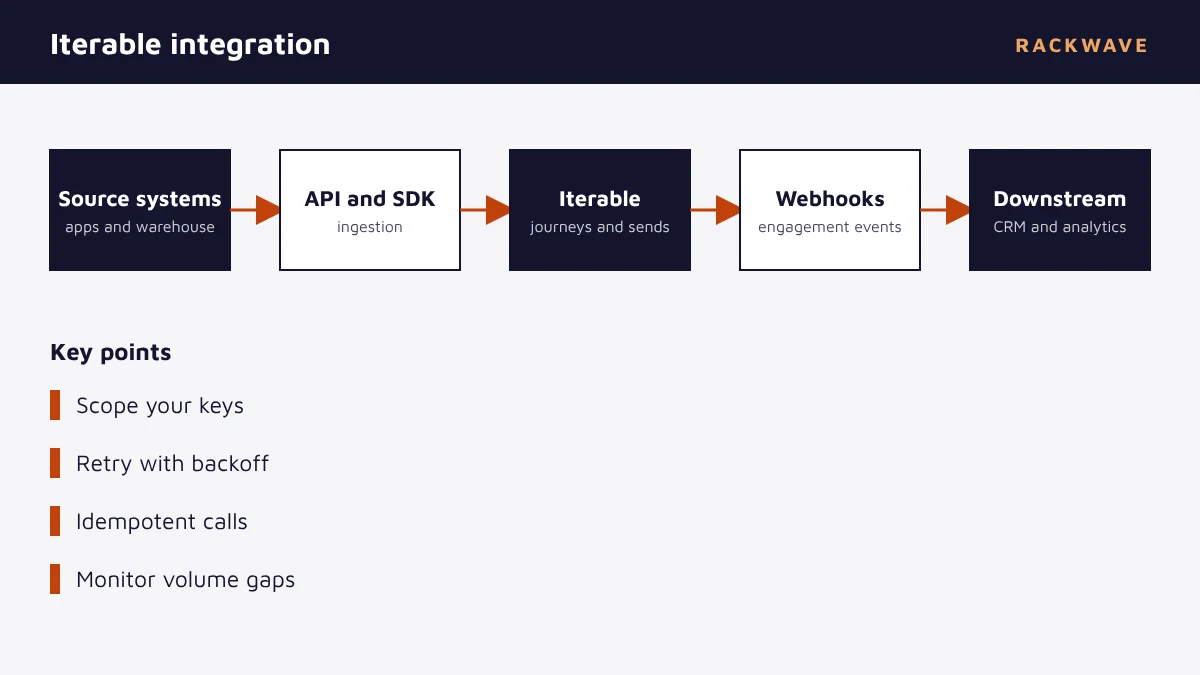
| Building block | Direction | Typical use |
|---|---|---|
| REST API | Into and out of Iterable | Update users, track events, manage lists, trigger sends, fetch data |
| Mobile and web SDKs | Into Iterable | Track behaviour, register devices, display in-app messages |
| Webhooks | Out of Iterable | Notify other systems of sends, clicks, bounces and unsubscribes |
| Event and data export | Out of Iterable | Load engagement data to a warehouse |
| Imports and catalog sync | Into Iterable | Bulk load users and items |
| Partner integrations | Both | Connect commerce, CDP and analytics tools |
Authentication and key management
- Use separate API keys for each integration and environment so that access can be revoked independently.
- Keep server side keys out of client applications, and use client side keys only for the SDK purposes they are designed for.
- Store keys in a secrets manager and rotate them on a schedule.
- Limit key permissions to the scopes an integration needs.
- Log which service uses which key and review the list each quarter.
Common integration patterns
| Pattern | How it works | Considerations |
|---|---|---|
| Real time event forwarding | Backend sends events as they occur | Needs retries, ordering and idempotency |
| Batch sync from warehouse | Scheduled job loads modelled attributes | Good for scores and segments. See reverse ETL |
| Webhook to CRM | Engagement events update records in a CRM | Map identifiers carefully |
| Trigger from application | Application calls the API to send a transactional message | Treat as a critical path and add fallbacks |
| Middleware orchestration | An integration platform routes data between systems | Central monitoring. See MuleSoft |
Reliability: errors, limits and retries
- Validate payloads before sending, including required identifiers and field types.
- Handle response codes: retry temporary errors and rate limit responses with exponential backoff, and log permanent failures.
- Make calls idempotent where possible so that retries do not create duplicates.
- Batch calls where the API supports it to reduce overhead.
- Queue events during outages and replay them in order.
- Keep a dead letter store for payloads that cannot be processed and review it daily.
How to build an Iterable integration
- Define data flows. List which systems send which data, in which direction and how quickly.
- Design the contract. Document identifiers, event names, field types and error handling.
- Build in a test project. Implement calls, webhooks and retries and validate against sample data.
- Secure the integration. Apply key management, least privilege and network controls.
- Test at scale. Run load tests and failure drills for outages and rate limits.
- Release in stages. Start with a subset of traffic and compare results with the source.
- Monitor and maintain. Alert on error rates, lag and volume changes and review keys and logs regularly.
Common mistakes
- Exposing server side keys in a mobile app or web page.
- Retrying without backoff, which worsens rate limit problems.
- Sending events with missing identifiers or inconsistent names.
- No idempotency, so retries trigger duplicate messages.
- Ignoring webhook failures and losing engagement data.
- Testing only with small volumes and then failing at campaign scale.
Our API development service builds and hardens integrations, and our system integration service connects Iterable to commerce, CRM and data platforms.
A worked example: order events from commerce to Iterable
A retailer forwards order events from its commerce platform to Iterable. The first version sends events directly from the checkout page and loses some when users close the browser. The team moves tracking to the order service, which publishes a message to a queue. A worker sends events to Iterable with backoff retries and an order id as the idempotency key.
A webhook sends bounce and unsubscribe events to the CRM so that support sees accurate status. Dashboards track lag, error rate and daily event counts compared with order totals. Data loss falls to near zero, and the same pattern is reused for returns and loyalty events.
Security and compliance
Integrations move personal data, so apply the same controls as for any customer system. Encrypt data in transit, restrict network access where possible, avoid logging full payloads that contain personal data and set retention for logs. Honour deletion and access requests by propagating them to Iterable through the API, and record consent changes with timestamps. Review vendor and region settings against your regulatory needs, and include Iterable in your data inventory and incident response plan.
Monitoring and operations
Treat the integration as a production service. Track request counts, error rates, latency, queue depth and the gap between source and Iterable counts. Alert on thresholds, keep runbooks for common failures and rehearse recovery from outages. Version your integration code, review changes before release and communicate API updates from the vendor to the owners. A weekly review of dead letters and warnings keeps small issues from becoming campaign failures.
Versioning, change control and documentation
APIs evolve, so manage change deliberately. Pin integration code to documented endpoints, subscribe to vendor change notices and test new versions in a sandbox project before production. Keep a data contract document that lists every event, field, type and owner, and update it with each release. Use code review and automated tests that check payload shape, and keep a rollback plan for each deployment. Good documentation lets new engineers understand flows quickly and helps marketing teams know what data they can rely on for segments and journeys.
Testing in a sandbox first
Use a separate test project with its own keys to validate every new call, webhook and mapping. Send realistic sample data, include bad payloads on purpose and confirm that errors are logged and alerted. Only promote to production after the test results match expectations and the owners have signed off.
Key takeaways
- Iterable integrates through REST APIs, SDKs, webhooks, exports and partner connectors.
- Use separate, scoped, rotated keys and keep server side keys off client applications.
- Design for reliability with validation, retries with backoff, idempotency and queues.
- Monitor error rates, lag and volume gaps against source systems.
- Apply privacy controls and propagate deletion and consent changes.
Quick glossary
| Term | Meaning |
|---|---|
| REST API | A web interface for reading and writing data over HTTP |
| Webhook | A callback that notifies another system of an event |
| Idempotency | Safe repetition of a call without duplicate effects |
| Backoff | Increasing wait times between retries |
| Dead letter queue | A store for messages that could not be processed |
Read next: What Is API Management? Lifecycle, Features, Tools · What Is a Message Queue? Patterns and Best Practices · What Is RabbitMQ? Exchanges, Queues and Use Cases
Frequently asked questions
What is Iterable API integration?
It is connecting Iterable to other systems using its REST API, SDKs, webhooks and connectors to move data and trigger messages automatically.
How do I authenticate with the Iterable API?
Use API keys sent with requests, store them in a secrets manager, scope them narrowly and rotate them regularly.
Can I trigger a message from my application?
Yes, applications can call the API to trigger campaigns or workflows, such as transactional messages, with fallbacks for failures.
How do I get engagement data out of Iterable?
Use webhooks for real time events and exports or warehouse connectors for bulk analysis.
How do I avoid duplicate events?
Use idempotency keys such as an order id and design retries so repeated calls have no extra effect.
What should I do about rate limits?
Batch calls, apply exponential backoff on limit responses and spread large loads over time.
Should API keys be in a mobile app?
Only client side keys intended for SDK use. Server side keys must stay on your servers.
How do I monitor an integration?
Track error rate, latency, queue depth and the difference between source and Iterable counts, with alerts and runbooks.