
What is MLflow in Databricks? MLflow is an open source platform for managing the machine learning lifecycle, and Databricks provides a managed version integrated with notebooks, the catalog and model serving. It records experiments with parameters, metrics and artefacts, packages models in a standard format, stores and versions them in a registry and supports deployment and evaluation, including for large language model applications. This guide explains the main MLflow components, how tracking and the model registry work, how to move a model from experiment to production, how to monitor and govern models and the mistakes that make results hard to reproduce. Features change, so confirm details in current documentation.
Short answer: MLflow tracks experiments, packages models, registers versions and helps deploy them. In Databricks it is integrated with Unity Catalog, so models get the same governance as data. Log everything, register models with clear aliases and promote through reviewed stages.
What is MLflow?
Machine learning work is easy to lose. A model scores well in a notebook, but weeks later nobody knows which data, parameters or code produced it. MLflow fixes this by recording runs and by providing a common format for models. It started as an open source project from the team behind Databricks and is widely used outside it. It is a core part of MLOps.
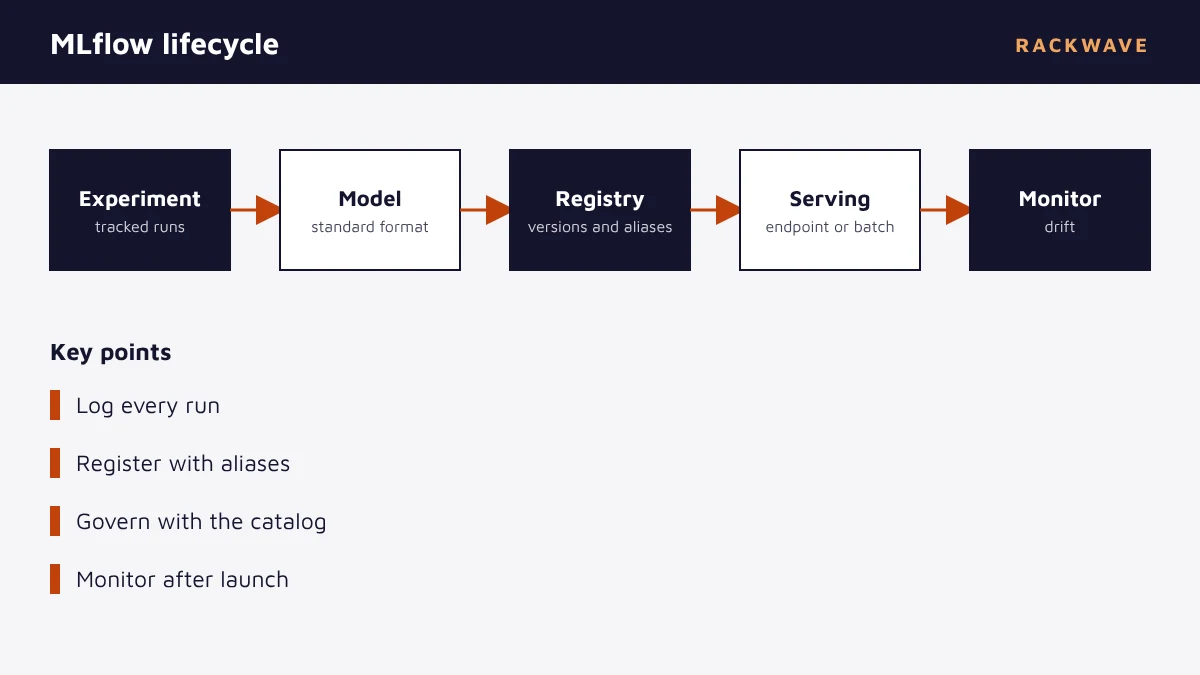
The main components
| Component | What it does |
|---|---|
| Tracking | Logs parameters, metrics, tags, code version and artefacts for each run |
| Models | Packages a model with its environment in a standard format with flavours for many libraries |
| Model registry | Stores model versions, aliases and metadata, integrated with Unity Catalog in Databricks |
| Serving | Deploys models as endpoints for real time scoring or for batch inference |
| Evaluation | Compares models and, for LLM applications, measures quality with metrics and judges |
| Tracing | Records the steps of LLM and agent applications for debugging |
Not every project needs every part. Tracking and the registry are the usual starting point.
Experiment tracking
- Create an experiment per problem, and one run per training attempt.
- Log parameters such as learning rate, metrics such as accuracy per epoch, the dataset version and the code commit.
- Use autologging for supported libraries to capture most details with a single line.
- Save useful artefacts such as plots, feature importance and the model itself.
- Compare runs in the user interface and select candidates by evidence, not memory.
The model registry and Unity Catalog
A registered model has versions, descriptions, tags and aliases such as champion and challenger. In Databricks, registering models in Unity Catalog means models use the same catalog, schema and permission model as tables, with lineage that links a model to the training data. Applications and jobs refer to a model by alias, so you can promote a new version by moving the alias without changing consumer code.
From experiment to production
- Frame the problem. Define the target, metric, baseline and the decision the model supports.
- Prepare features. Build governed feature tables with clear definitions. See feature engineering.
- Train and track. Run experiments, log everything and compare candidates.
- Evaluate. Test on held-out and recent data, check fairness and segment performance.
- Register. Register the chosen model and record its owner and intended use.
- Deploy. Serve through an endpoint or batch job and use an alias for the live version.
- Monitor and retrain. Track data drift and performance, and retrain on a schedule or trigger.
Serving and monitoring
Real-time serving exposes a model as a REST endpoint with scaling and logging, while batch inference scores large tables on a schedule and writes results back. Monitor input data for drift, prediction distributions and the business metric the model influences. Record each prediction with the model version so you can investigate issues later. Define who is on call, what triggers a rollback and how a previous version is restored by moving the alias back.
Large language model applications
- Track prompts, model versions and parameters as runs so you can reproduce behaviour.
- Use evaluation sets and metrics to compare prompts and models before launch. See prompt engineering.
- Trace multi-step chains and agents to find where answers go wrong. See RAG.
- Apply the same registry and governance approach as for classic models, plus checks for hallucination. See AI hallucination.
Governance and risk
Treat each production model as a product with an owner, intended use, known limits and a review date. Record the training data, features, evaluation results and approval in the registry, and keep that record with the model version. For models that affect people, such as credit or hiring decisions, add fairness testing and human review, and follow the guidance in responsible AI. Restrict who can promote to production, and log every promotion. Retire models that are no longer used so they do not quietly keep running.
| Control | Why it matters |
|---|---|
| Named model owner | Someone is accountable for behaviour and retraining |
| Documented intended use | Prevents use in situations the model was not built for |
| Approval before promotion | Adds a second pair of eyes |
| Prediction logging with version | Allows investigation and audit |
| Scheduled review | Catches drift and obsolete models |
Reproducibility checklist
- Record the exact training data version or snapshot.
- Record the code commit and library versions or the environment file.
- Set and log random seeds where relevant.
- Log the metrics used for selection and the thresholds chosen.
- Store the evaluation set so later models are compared fairly.
Feature tables and training data
Good models start with consistent features. Keep feature definitions in governed tables so training and scoring use the same logic, and record which snapshot of the data trained each model. Point-in-time correctness matters: a feature must use only information that was available at the prediction time, or the model will look better in testing than it ever will in production.
Common mistakes
- Logging nothing, then being unable to reproduce the best run.
- Evaluating only on a random split and ignoring recent or segment data.
- Promoting by copying files instead of using the registry.
- No owner or monitoring after deployment.
- Skipping documentation of intended use and limits.
A worked example
A subscription company builds a churn model. The data scientist logs twenty runs with different features, picks the best by recall at a fixed precision and registers it in the catalog with the training table recorded as lineage. A reviewer checks performance by region and plan type, and the alias champion is moved to the new version. A weekly batch job scores customers and writes risk bands to a table used by the retention team.
Monitoring compares the live score distribution with training. When drift appeared after a pricing change, the team retrained and promoted a new version in a day. The example is illustrative.
Best practices and support
- Standardise experiment names, tags and the metrics every project must log.
- Keep training code in version control and log the commit with each run.
- Review models before promotion with a short checklist covering data, fairness, security and intended use.
- Set retention and cleanup rules for old runs and unused versions.
Our AI and machine learning service sets up MLOps on Databricks, and our data governance service covers model risk and documentation.
Key takeaways
- MLflow tracks experiments, packages models and manages versions.
- In Databricks, models are governed through Unity Catalog.
- Log parameters, data version and code commit for every run.
- Promote models by alias after review and testing.
- Monitor drift and keep rollback simple.
Quick glossary
| Term | Meaning |
|---|---|
| MLflow | Open source ML lifecycle platform |
| Run | One recorded training attempt |
| Model registry | Store of model versions and aliases |
| Alias | A named pointer to a model version |
| Drift | Change in data or predictions over time |
Read next: What Is Fine-Tuning? Methods, Data and Costs · What Is Feature Engineering? Techniques and Workflow · What Is Explainable AI? Methods, SHAP and LIME
Frequently asked questions
What is MLflow?
It is an open source platform for tracking experiments, packaging models, registering versions and deploying them.
How does MLflow tracking work?
Each run logs parameters, metrics, tags, code version and artefacts so results can be compared and reproduced.
What is the model registry?
A store of model versions with aliases and metadata, integrated with Unity Catalog in Databricks.
How do I promote a model?
Register the new version and move an alias such as champion to it after review and testing.
Can MLflow handle LLM applications?
Yes. It supports tracking, evaluation and tracing for LLM and agent applications.
How do I deploy a model?
Serve it as a real-time endpoint or run it in a batch job, and reference it by alias.
How do I monitor a model?
Track input drift, prediction distribution, performance and the business outcome, and log model versions with predictions.
Do I need Databricks to use MLflow?
No. MLflow is open source, but Databricks offers a managed and integrated version.