
What is Auto Loader in Databricks? Auto Loader is a Databricks feature that incrementally and efficiently ingests new files from cloud storage as they arrive. It tracks which files have been processed, scales to millions of files, infers and evolves schemas and writes to Delta tables with exactly-once guarantees when used with checkpoints. This guide explains how Auto Loader works, the difference between directory listing and file notification modes, how schema inference and the rescued data column behave, how to use it in streaming and batch style, how to handle bad data, cost and monitoring and when to choose another approach. Options change by release, so confirm details in current Databricks documentation.
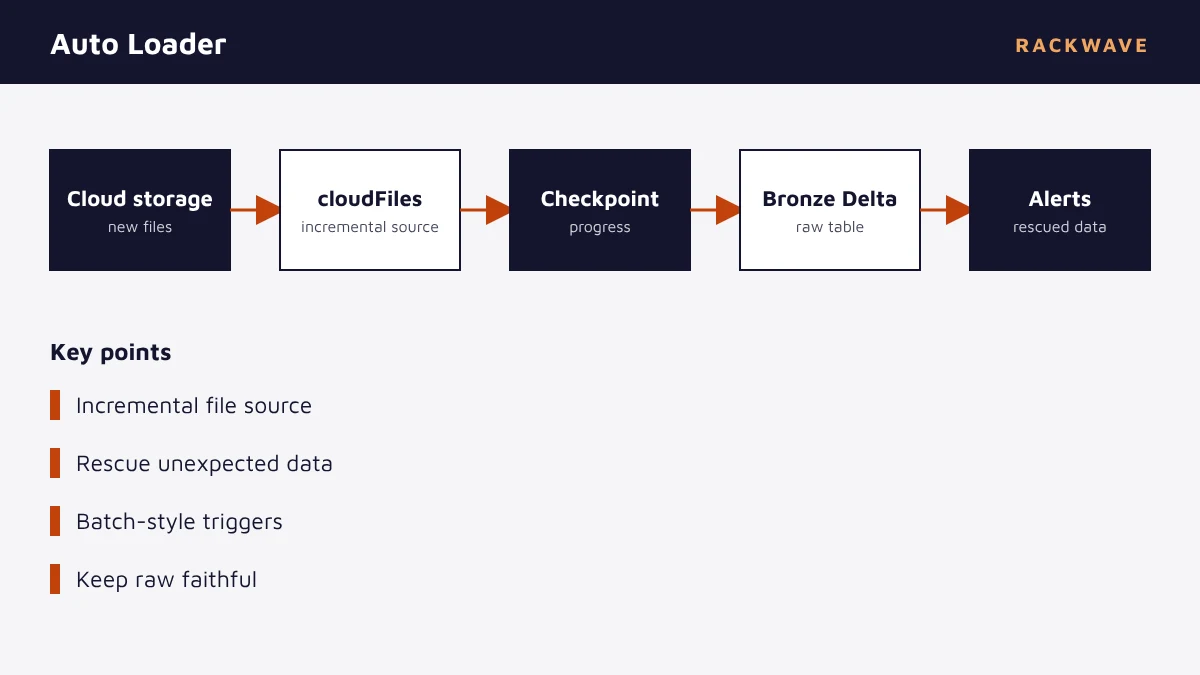
Short answer: Auto Loader reads new files from cloud storage through the cloudFiles source, remembers what it has processed in a checkpoint and writes to Delta. Use it for file ingestion into bronze tables, with schema evolution and a rescued data column for unexpected fields.
What is Auto Loader?
Ingesting files sounds simple until volumes grow. Listing a bucket with millions of objects each run is slow, and keeping track of which files were handled is error prone. Auto Loader solves this with an incremental file source for Structured Streaming. You point it at a folder, tell it the file format and it processes only new files. It is the standard front door for bronze tables in Databricks and works inside Delta Live Tables pipelines and jobs.
How it discovers files
| Mode | How it works | Choose when |
|---|---|---|
| Directory listing | Lists the input path incrementally to find new files | Simple setups and small to medium volumes, no extra cloud permissions |
| File notification | Uses cloud storage events and a queue to learn about new files | Very large volumes or directories where listing would be slow |
File notification mode needs additional cloud permissions and resources, so plan access with your cloud team before choosing it.
Basic pattern
df = (spark.readStream
  .format("cloudFiles")
  .option("cloudFiles.format", "json")
  .option("cloudFiles.schemaLocation", "/checkpoints/orders_schema")
  .load("/landing/orders/"))

(df.writeStream
  .option("checkpointLocation", "/checkpoints/orders")
  .trigger(availableNow=True)
  .toTable("bronze.orders"))
This is a simplified sketch. The trigger availableNow processes all new files and then stops, which gives batch-style cost with streaming bookkeeping.
Schema inference and evolution
- Auto Loader can infer the schema from a sample of files and store it at the schema location.
- When new columns appear, it can add them according to the evolution mode you choose, stop with an error or rescue them.
- A rescued data column captures values that did not match the schema, such as an extra field or a type mismatch, so no data is lost.
- For stricter control, provide an explicit schema or schema hints for important columns.
- Review schema changes before they reach curated tables. See Delta Lake for schema enforcement.
How to set up file ingestion
- Agree the file contract. Define format, folder structure, naming and delivery frequency with the source team.
- Create storage access. Use governed external locations or volumes. See Unity Catalog.
- Choose the mode. Start with directory listing and move to notifications for scale.
- Define schema handling. Pick an evolution mode and keep a rescued data column.
- Write to a bronze table. Add the source file path and ingest time as columns.
- Pick the trigger. Use availableNow on a schedule for batch needs or continuous for low latency.
- Monitor. Track files processed, lag and rescued data volume.
Handling bad data
Bad files happen. Keep the raw record in the bronze table with its source file name, send unparseable rows to a quarantine location and report counts to the owning team. Do not silently drop data. For corrupt files, configure the behaviour you want, such as ignoring and recording the file, and build an alert. Downstream silver logic should filter and fix, while bronze keeps the faithful copy so you can replay after a fix.
Cost and performance
- Directory listing is cheap for modest volumes, but listing very large folders adds time and cost.
- File notifications reduce listing but require queue and event resources that have their own small cost.
- Compact small files upstream where possible, because millions of tiny files slow everything.
- Use availableNow on a schedule instead of a continuously running stream when freshness of minutes is enough.
- Size compute to the batch of new files and use autoscaling with limits.
Auto Loader compared with other ingestion
| Option | Strength | Limit |
|---|---|---|
| Auto Loader | Incremental files, schema evolution, scale | Files in cloud storage only |
| COPY INTO | Simple idempotent SQL loads | Better for smaller, scheduled loads |
| Streaming from message systems | Low latency events | Needs a message platform. See Apache Kafka |
| Database replication tools | Keep tables in step with operational databases | Handled by CDC tooling. See change data capture |
Many platforms use several options, one per source type.
Designing the landing area
| Decision | Recommendation | Reason |
|---|---|---|
| Folder structure | Source, entity and date folders | Makes replays and debugging easy |
| File format | Prefer columnar formats such as Parquet where possible, JSON or CSV only when required | Smaller, faster and typed |
| File size | Aim for moderate sizes rather than many tiny files | Reduces listing and processing overhead |
| Retention | Keep raw files for the replay window you need | Lets you rebuild bronze after a fix |
| Permissions | Writers can add files, the pipeline can only read | Protects the raw record |
Agree these points in writing with the team that produces the files. Most ingestion incidents trace back to changes in the file contract that nobody announced, so add a contact and a change process to the agreement, and test the pipeline whenever the contract changes.
Metadata worth capturing
- The source file path and modification time, so any bronze row can be traced to its file.
- The ingest timestamp and pipeline run id for audit and replay.
- The schema version or a hash of the columns seen, to spot silent changes.
- Counts of rows read, rows rescued and files skipped per run, written to a monitoring table.
Common mistakes
- Sharing one checkpoint location between different streams.
- Not setting a schema location, so schema inference repeats or breaks.
- Letting unexpected columns flow into curated tables without review.
- Running a continuous stream for a feed that arrives once a day.
- Ignoring the rescued data column until it holds months of lost fields.
A worked example
A retailer receives order files from forty stores into cloud storage, with irregular timing. A job runs Auto Loader every ten minutes with availableNow into a bronze orders table that includes the file name and ingest time. When one store added a loyalty field, the rescued data column captured it and an alert prompted the team to add it deliberately to the silver model.
Total compute cost stayed small because the cluster ran only for a few minutes per run, and replaying a day after a bug fix was a single rerun from bronze. The example is illustrative.
Best practices and support
- Keep the landing area read-only for the pipeline and retain files long enough for replay.
- Version the file contract and agree how changes will be announced.
- Record lineage from landing files to bronze tables in the catalog.
- Test with a malformed file before go-live.
Our data analytics service builds ingestion on Databricks, and our system integration service connects source systems that deliver the files.
Key takeaways
- Auto Loader ingests new files incrementally from cloud storage.
- Choose directory listing first and notifications for scale.
- Schema inference and a rescued data column protect against change.
- Use availableNow on a schedule for batch-style cost.
- Keep bronze faithful so you can replay.
Quick glossary
| Term | Meaning |
|---|---|
| Auto Loader | Incremental file ingestion feature |
| cloudFiles | The source format used by Auto Loader |
| Checkpoint | Stored progress that prevents reprocessing |
| Rescued data column | Column that holds unmatched values |
| availableNow | Trigger that processes all new data and stops |
Read next: BigQuery vs Snowflake: Which Cloud Data Platform? · BigQuery Streaming Inserts: Real-Time Ingestion Guide · BigQuery Access Control: IAM, Policy Tags and Row Security
Frequently asked questions
What is Auto Loader?
A Databricks feature that incrementally ingests new files from cloud storage and tracks processed files with checkpoints.
What are the file discovery modes?
Directory listing, which scans the path incrementally, and file notification, which uses cloud events and a queue.
Does Auto Loader infer schema?
Yes. It can infer and store a schema and evolve it when new columns appear, based on the mode you choose.
What is the rescued data column?
A column that captures values that did not fit the schema, so unexpected data is kept instead of lost.
Can I use it in batch style?
Yes, with a trigger such as availableNow that processes all new files and then stops.
How does it avoid duplicate loads?
It records processed files in the checkpoint, which provides exactly-once processing when used correctly.
When is COPY INTO better?
For smaller scheduled loads where simple idempotent SQL is enough.
How do I monitor it?
Track files processed, lag, rescued data volume and failures in the pipeline or job metrics.