
CRM implementation is the work of planning, configuring, integrating and launching a customer relationship management system so that people actually use it and the business gets value from it. Choosing software is the smaller part. This guide gives a practical roadmap, the roles you need, common pitfalls and how to measure success.
Short answer: A successful CRM implementation follows five phases: discover goals and processes, design the data model, build and migrate, launch with training, and keep improving through adoption metrics. Most failures trace back to unclear goals, poor data or weak user adoption, not to the software.
What is CRM implementation?
It covers everything between deciding to use a CRM and having it run reliably in daily work: requirements, configuration, data migration, integration with other systems, security, testing, training and support. If you are still learning the basics, start with what is CRM.
The five-phase roadmap
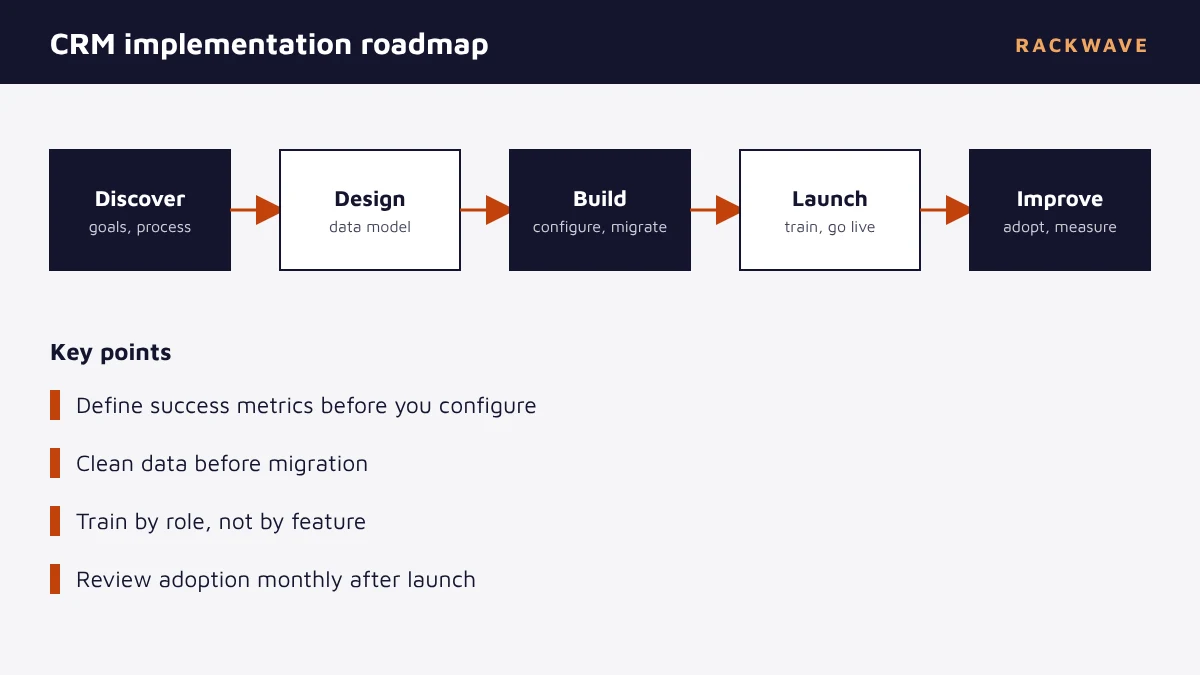
Phase 1: Discover
Interview stakeholders in sales, marketing, service and operations. Map the processes you run today, find where leads are lost or work is repeated, and agree three to five measurable goals, such as faster lead response or an accurate forecast. Decide the scope of the first release.
Phase 2: Design
Translate processes into a data model: objects, fields, relationships, record types and the lifecycle stages a lead or deal passes through. Define roles and security, reports you need on day one, and the systems that must integrate. Keep the first release small and focused.
Phase 3: Build and migrate
Configure the platform in a sandbox, build automation, and set up integrations. Clean and map existing data, then load it in the right order, parents before children. Test with real scenarios, and have business users run them, not only the project team.
Phase 4: Launch
Train each role on the tasks they perform, not on every feature. Plan a go-live date that avoids peak periods, provide floor support in the first weeks and keep a list of quick fixes. Consider a phased release by team or region to reduce risk.
Phase 5: Improve
After launch, review adoption and data quality monthly. Collect feedback, retire unused fields, add automation where manual work remains and release changes on a regular cadence.
Roles you need
| Role | Responsibility |
|---|---|
| Executive sponsor | Owns goals, removes blockers, signals priority |
| Project manager | Plans, tracks risks and keeps the schedule |
| Business analyst | Captures requirements and process maps |
| Administrator / architect | Configures the platform and designs the data model |
| Data lead | Cleans, maps and validates migrated data |
| Integration engineer | Connects the CRM to other systems |
| Change and training lead | Plans communication, training and support |
| Business champions | Represent each team and test with real scenarios |
Common reasons CRM projects fail
- No clear objectives. Without measurable goals, scope expands and success cannot be shown.
- Poor data. Migrating duplicates and gaps destroys trust in the first week.
- Low adoption. Users revert to spreadsheets when the system is slow or demands too much input.
- Over-customisation. Heavy code makes upgrades and changes expensive.
- Weak ownership. Nobody maintains the system after the project team leaves.
- Ignored integrations. A CRM disconnected from finance and support gives a partial view.
A CRM that people avoid is worse than no CRM. Plan for adoption from the first workshop.
Implementation checklist
- Write the goals. Three to five measurable outcomes the project must deliver.
- Pick the platform. Compare options against requirements. See Salesforce, HubSpot and Dynamics 365.
- Design the data model. Keep it as simple as your reporting allows.
- Clean and migrate data. Deduplicate, standardise and validate before loading.
- Integrate key systems. Start with the ones that affect daily work most.
- Train by role and go live. Short sessions, real scenarios, support on hand.
- Review and iterate. Track adoption, data quality and business metrics.
Measuring success
Choose metrics linked to your goals. Adoption measures such as weekly active users and the percentage of opportunities with up-to-date stages show whether people use the system. Business measures, such as lead response time, conversion by stage, forecast accuracy and case resolution time, show whether it helps. Compare against a baseline taken before launch so you can demonstrate progress.
Cost and timeline
Cost includes licences, implementation services, integration, data migration, training and ongoing administration. Timelines vary with scope: a focused single-team deployment can take weeks, while multi-team programmes with integrations take several months. Ask vendors for an estimate against your written requirements, and keep a contingency for data clean-up, which is often underestimated.
Our CRM implementation services cover this roadmap end to end, and our Salesforce consulting team specialises in Salesforce programmes.
Data migration for a CRM
Data is the part of a CRM project most often underestimated. Start by profiling the source: count records, find duplicates, check mandatory fields and see how consistent formats are. Decide what to migrate and what to archive, because loading ten years of inactive records rarely adds value. Our guide to what is data migration covers the process, and our Salesforce data migration service handles the heavy lifting.
Rehearse the migration at least once in a sandbox with a full-size extract. Reconcile counts and totals, spot-check records with business users and fix mapping errors before the real load.
Change management and training
A CRM changes how people work, so treat the project as a change programme. Explain why the change matters, show each team what is in it for them and recruit respected colleagues as champions. Keep training short and role-based, with real scenarios, recorded sessions and quick-reference guides. After go-live, provide a visible support channel and respond fast, because the first weeks decide whether habits stick.
Security and compliance
Customer data carries legal obligations. Design access by role so people see only what they need, enable audit trails and agree retention rules. If you operate in several regions, consider data residency and privacy laws such as GDPR and India's DPDP Act from the start, since retrofitting is harder than designing for it.
After go-live
Plan a regular release rhythm, for example monthly, so improvements reach users without large disruptive projects. Keep a prioritised backlog drawn from user feedback and from adoption and data-quality reports, and assign an administrator to own it. Revisit your original goals every quarter and confirm that the CRM is still helping you reach them.
Questions to ask an implementation partner
- Which similar projects have you delivered, and can we speak to those clients?
- Who will actually work on our project, and what are their certifications?
- How do you handle data migration, and how many rehearsals do you run?
- How will you measure and report adoption after go-live?
- What is included in post-launch support, and for how long?
- How do you manage scope changes and fixed-price boundaries?
- What do you expect from our team each week?
A good partner asks as many questions as you do. If they promise a date before they understand your processes and data, treat that as a warning sign. Look for a plan that names deliverables for each phase, identifies your responsibilities and explains how risks will be reported.
Key takeaways
- Implementation runs in five phases from discovery to improvement.
- Most failures come from unclear goals, poor data and low adoption.
- Keep the first release small and focused.
- Train by role and measure adoption after go-live.
- Assign long-term ownership for the system.
Quick glossary
| Term | Meaning |
|---|---|
| Go-live | The date a system starts being used for real work |
| Sandbox | A test copy of the system used before release |
| Adoption | The share of users who use the system as intended |
| Data model | The structure of objects, fields and relationships |
Read next: Lead Nurturing: Strategy, Tactics and Examples · Data Quality: Dimensions, Causes and How to Improve It · What Is a Data Pipeline? Components, Types and Examples
Frequently asked questions
What is CRM implementation?
CRM implementation is the process of planning, configuring, integrating and launching a CRM system so teams can use it effectively, including data migration, training and support.
How long does CRM implementation take?
A focused deployment for one team can take a few weeks, while multi-team programmes with integrations and data migration take several months. Scope and data quality have the biggest effect.
What are the steps in CRM implementation?
The main steps are discovery, design, build and data migration, launch and training, and ongoing improvement. Each phase should have clear deliverables and owners.
Why do CRM implementations fail?
Common causes are unclear goals, poor data quality, low user adoption, excessive customisation and no ongoing ownership. These are largely process and people issues, not software issues.
How much does CRM implementation cost?
Cost depends on the platform, scope, number of users, integrations and data volumes. Include licences, services, migration, training and administration when budgeting, and request quotes against written requirements.
Who should be on the CRM project team?
You need an executive sponsor, project manager, business analyst, platform administrator or architect, data lead, integration engineer, training lead and champions from each user group.
How do I get users to adopt the CRM?
Involve users early, keep required fields to the essentials, train by role, make the CRM the source for reports and meetings, and track adoption metrics after launch.
Should I customise my CRM heavily?
Start with standard features and configure rather than code where possible. Add customisation only for clear business value, because heavy customisation raises cost and slows upgrades.