
What are dbt models? dbt models are SQL select statements, each saved in its own file, that dbt turns into tables or views in your warehouse. They are the core building block of a dbt project: every transformation, from cleaning a raw table to calculating revenue, is a model that can reference other models. dbt works out the order, runs them and lets you test and document each one. This guide explains how models work, the materializations available, how to use ref and configuration, how to structure staging, intermediate and mart models, how to optimise cost and performance and the mistakes that produce slow or tangled projects. Details vary by version and adapter, so confirm in current dbt documentation.
Short answer: Write each model as a single select, reference upstream models with ref, choose a materialization that fits size and freshness, keep models small and layered, and add tests and descriptions as you go.
How a model works
A model file contains a select statement and optional configuration. When you run dbt, it wraps the select in the correct create statement for your warehouse, replaces ref calls with the real table names and runs the models in dependency order. You never write create or insert statements yourself, which keeps logic readable and portable. See getting started with dbt and data modeling.
Materializations compared
| Materialization | What it builds | Best for | Trade-off |
|---|---|---|---|
| View | A database view | Light transformations, staging models | Recomputed on every query |
| Table | A full table rebuilt each run | Marts queried often | Rebuild cost grows with data |
| Incremental | Adds or updates only new rows | Large event or fact tables | More logic, needs a good key. See incremental models |
| Ephemeral | Inlined as a subquery | Small reusable logic | Not queryable on its own |
| Materialized view | Warehouse-managed refreshed view | Supported platforms with frequent reads | Platform-specific behaviour |
Set the default in project configuration and override per model.
Layering models
| Layer | Purpose | Rules |
|---|---|---|
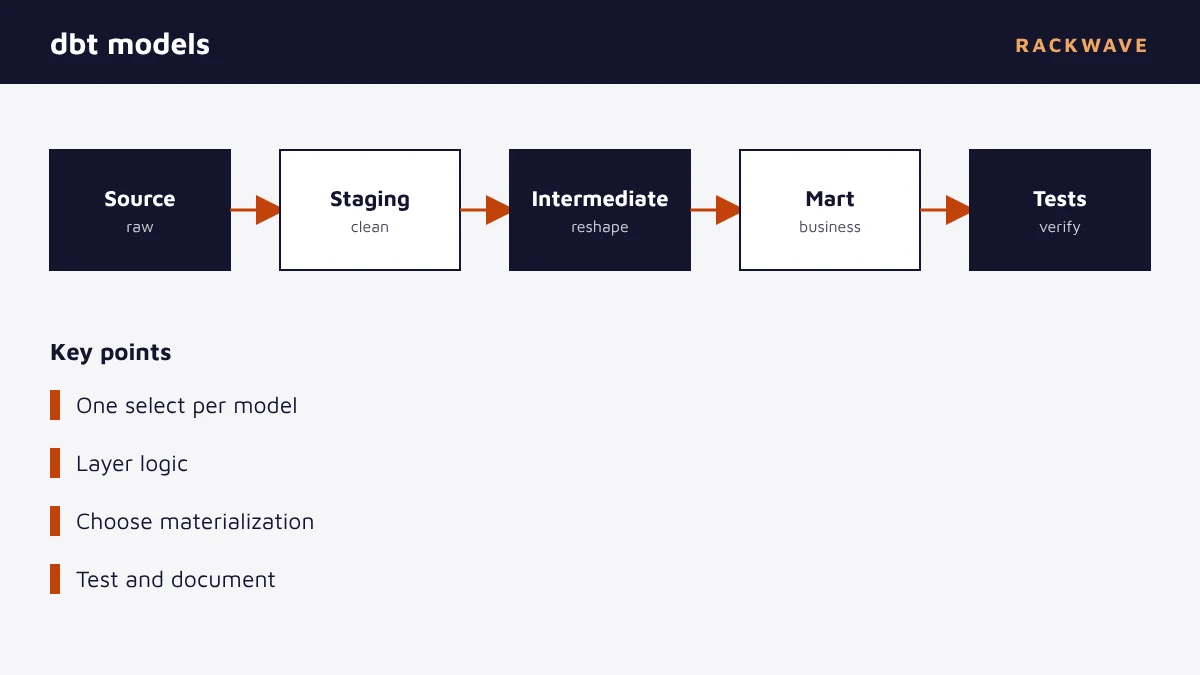
| Staging | One model per source table, cleaned and renamed | No joins, light casting only, usually views |
| Intermediate | Reshapes and combines staging models | Reusable steps, not exposed to BI |
| Marts | Business entities and facts | Tables, tested and documented, owned by a team |
This keeps logic in one place, makes lineage easy to read and limits the impact of source changes to the staging layer.

Writing good models
- Start from a clear question. Define the grain: what does one row represent?
- Select from refs and sources. Use ref for models and source for raw tables.
- Keep one purpose per model. Split long queries into named steps.
- Use common table expressions. Name each step so the query reads top to bottom.
- Configure the materialization. Set it in the file header or project file.
- Add tests and descriptions. Document the grain and key columns.
Configuration options worth knowing
- Schema and alias settings to control where a model is built.
- Tags to group models for selective runs.
- Grants to manage who can read the output.
- Contracts and constraints to enforce column types and shape.
- Access modifiers to mark public and private models.
- Pre and post hooks for small, controlled side effects.
Performance and cost
Models run on your warehouse, so poor SQL costs money. Filter early, select only needed columns, avoid unnecessary cross joins and use incremental builds for large tables. Review run times after each release, and use partitioning and clustering features of your platform where they help. Build only what changed in continuous integration using state selection, and avoid rebuilding the entire project for a small edit.
- Filter and prune columns early.
- Use incremental models for large facts.
- Check query plans for the heaviest models.
- Use selective runs in development.
Testing models at the right level
Every model should have tests that match its role. Staging models need key checks such as unique and not null, mart models need relationship and accepted-value tests and critical business metrics deserve custom checks against known totals. Run tests on every build and treat a failure as a blocker for downstream models, not an afterthought. See dbt tests for the full approach.
Add unit-style tests for complex logic using small fixed inputs and expected outputs, so refactoring can be done with confidence. Together these checks turn models from fragile scripts into dependable data products.
- Key tests on every model.
- Relationship tests between facts and dimensions.
- Custom tests for critical metrics.
- Unit tests for complex logic.
Handling slowly changing and late-arriving data
Facts often arrive late and dimensions change over time. Decide per model how to handle updates: overwrite, keep history with a snapshot or reprocess a trailing window in an incremental model. Writing the rule into the model description prevents confusion when numbers change after a rerun, and keeps reports consistent with business expectations. See snapshots.
Naming conventions that scale
Agree naming rules early and enforce them in review. Prefix staging models, name marts after the business entity, use singular names for dimensions and describe time grain in fact table names. Consistent names make lineage readable and let new team members find the right model quickly.
- Prefix by layer.
- Name marts after business entities.
- Include grain in fact names.
Common mistakes
- Models with several grains mixed together.
- Long, unreadable queries with nested subqueries.
- Hard-coded table names instead of ref and source.
- Everything built as a table, even tiny lookups.
- No descriptions or tests on mart models.
- Business logic duplicated across several models.
A worked example
A team had one huge query that built a revenue report. They split it into staging models for orders and payments, an intermediate model that joined them at order grain and a mart for daily revenue. Staging stayed as views, and the mart became an incremental table.
Run time dropped sharply, a bug in payments was fixed in one place and lineage showed exactly how the report was built. The example is illustrative.
Best practices and support
- Document the grain of every mart.
- Use consistent naming and folder structure.
- Review SQL in pull requests.
- Track run time and cost per model.
Our data analytics service and data warehousing service design clean, efficient dbt model layers.
Related guides
Read dbt tests, macros and Jinja, project structure and ETL pipelines for related topics.
Model quality checklist
| Item | Done when |
|---|---|
| Grain | Stated in the description |
| Refs | No hard-coded table names |
| Materialization | Chosen deliberately |
| Tests | Keys and key rules tested |
| Docs | Columns described |
| Cost | Run time reviewed |
Model contracts and public interfaces
As projects grow, some models become interfaces used by other teams. Mark these as public, define contracts that fix column names and types and version them when you must make breaking changes. This lets producers change internals safely and gives consumers a stable target. Keep internal models private so that teams cannot depend on them by accident.
- Mark shared marts as public.
- Enforce contracts on public models.
- Version breaking changes.
- Keep internals private.
Refactoring and deprecation
Models accumulate. Review unused models regularly using lineage and query logs, deprecate them with a clear date and remove them once nothing depends on them. Refactor in small steps, comparing results before and after, so a change in structure never changes the numbers unexpectedly.
Key takeaways
- A model is one select statement.
- Use ref to build the graph.
- Pick materializations deliberately.
- Layer staging, intermediate and marts.
- State the grain.
Quick glossary
| Term | Meaning |
|---|---|
| Model | SQL select built as table or view |
| Materialization | Build strategy for a model |
| Grain | What one row represents |
| Contract | Enforced column definitions |
| Mart | Business-facing model |
Read next: BigQuery vs Snowflake: Which Cloud Data Platform? · BigQuery Streaming Inserts: Real-Time Ingestion Guide · BigQuery Access Control: IAM, Policy Tags and Row Security
Frequently asked questions
What is a dbt model?
A SQL select statement in a file that dbt builds as a table or view in the warehouse.
What does the ref function do?
It references another model, resolves its real name and builds the dependency order.
Which materialization should I use?
Views for light staging, tables for marts, incremental for large facts and ephemeral for small helpers.
What is model grain?
The level of detail one row represents, such as one row per order.
Can models contain joins?
Yes, usually in intermediate and mart layers rather than in staging.
How do I speed up slow models?
Filter early, prune columns, use incremental builds and review the query plan.
What are model contracts?
Enforced definitions of column names and types for models used by others.
How do I organise models?
Use staging, intermediate and mart folders with consistent naming.