
What is Braze Cloud Data Ingestion? Braze Cloud Data Ingestion, often shortened to CDI, is a feature that connects Braze directly to a data warehouse or cloud storage, so you can sync user attributes, events, purchases and catalog data from your own tables into Braze on a schedule, without building custom API integrations. Supported sources include popular cloud data warehouses and storage services, such as Snowflake, Amazon Redshift, Google BigQuery, Databricks and cloud file storage. CDI lets data teams keep the warehouse as the single source of truth and use SQL models to decide what marketing teams can target and personalise with. This guide explains how Braze Cloud Data Ingestion works, how it compares with the REST API, SDK and reverse ETL tools, how to set it up, how to design tables and sync schedules, governance and common mistakes. Check current Braze documentation for supported sources and limits.
Short answer: Braze CDI syncs data from your warehouse into Braze on a schedule using a query or table you control. It is ideal for warehouse driven attributes, scores and catalogs, while real time behaviour is better sent by the SDK or API.
What is Braze Cloud Data Ingestion?
CDI is a data integration capability within Braze that brings warehouse data into profiles and catalogs. It complements the Braze SDK, the REST API and Braze Currents, which exports data out. It is related to reverse ETL and relies on a modelled data warehouse.
How Braze Cloud Data Ingestion works
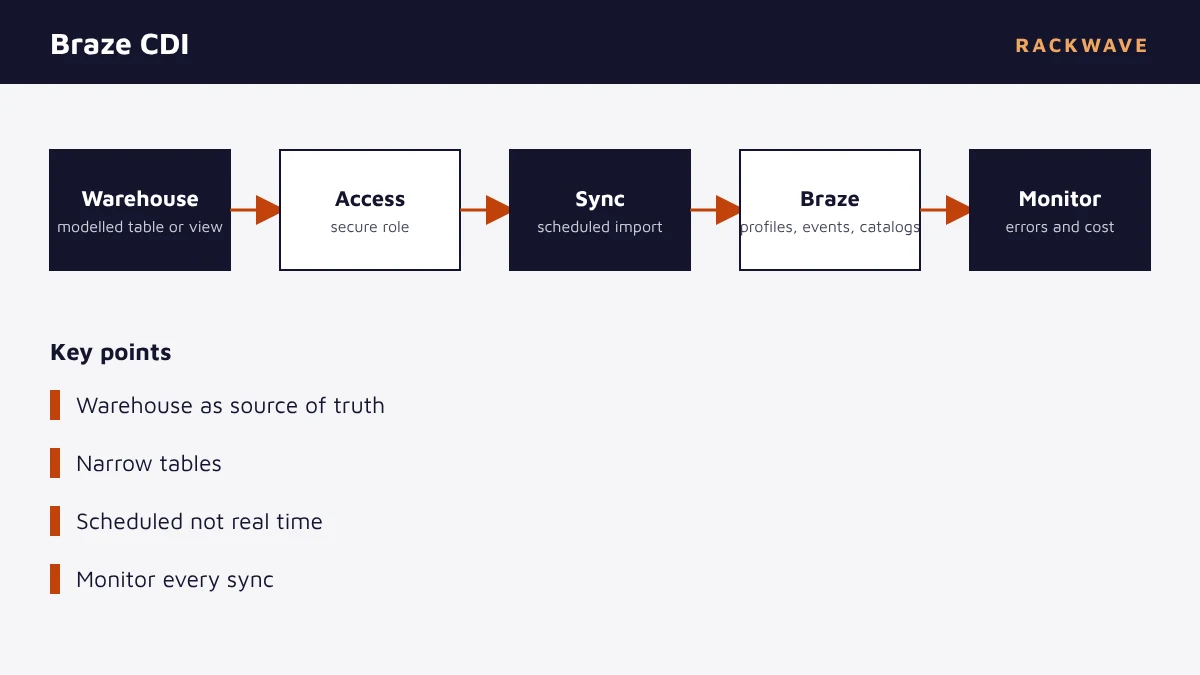
- Model data in your warehouse: create a table or view that contains the identifier and the data to send.
- Grant access: create a service role or credentials with read access to the object and allow the Braze connection.
- Create the integration in Braze: choose the source type, enter connection details and define the sync.
- Choose the data type: attributes, custom events, purchases, or catalog items.
- Set the schedule: run on a recurring schedule, with updates based on a timestamp or changed rows.
- Run and monitor: Braze reads new or updated rows, applies them to profiles and reports sync status and errors.
CDI compared with other ways to send data
| Method | Strength | Limit |
|---|---|---|
| Braze SDK | Real time app and web behaviour | Only data captured on the client |
| REST API | Real time server side events | Requires engineering work and rate management |
| Cloud Data Ingestion | Warehouse driven data, no custom code, SQL controlled | Scheduled rather than instant |
| Reverse ETL tool | Broad destinations, rich mapping and monitoring | Extra tool and cost |
| CSV upload | Quick one off imports | Manual and error prone |
| Partner integrations | Connect specific tools quickly | Less control over data model |
Typical use cases
| Use case | Example |
|---|---|
| Predictive scores | Churn risk or lifetime value computed in the warehouse and synced as attributes |
| Customer segments | Warehouse defined audiences, such as high value customers, synced as attributes |
| Offline and backend events | Store purchases or contract changes from systems not connected to the SDK |
| Catalog data | Product feeds and content lists synced to catalogs for personalisation. See Braze catalogs |
| Backfills and corrections | Fix or update attributes in bulk using SQL |
| Consent and preference sync | Keep subscription related attributes aligned with a system of record |
Designing tables and syncs
- Include a stable identifier column, such as the external ID, that matches Braze profiles.
- Keep the table narrow: only fields you plan to use, with clear names and consistent data types.
- Add an updated timestamp so only changed rows are synced.
- Separate different data types, such as attributes and events, into different objects.
- Test with a small sample before syncing millions of rows.
- Plan the sync schedule around warehouse refresh times, so Braze reads fresh data. See what is data integration
How to set up Cloud Data Ingestion
- Define the use case and owner. Agree which data supports which campaigns, and who maintains the model.
- Build and test the warehouse model. Create the table or view and validate counts, nulls and types. See what is dbt
- Set up secure access. Create a least privilege role and follow network and credential requirements for your warehouse.
- Create the integration in Braze. Configure the source, data type, mapping and schedule.
- Run a test sync. Sync a small sample and confirm profile or event data in the dashboard.
- Go live and monitor. Enable the schedule, review logs and errors and alert the data team on failures.
- Review regularly. Retire unused syncs, check cost and keep documentation current.
Governance, privacy and cost
Warehouse data can include sensitive fields, so decide in advance what may leave the warehouse. Send only data needed for messaging, respect consent and regional rules, and log which datasets feed which syncs. Data points synced to Braze may count towards limits or costs, so avoid syncing unused attributes or high volume events by default. Document each sync in a data catalog with owner, purpose, schedule and downstream usage.
Common mistakes
- Syncing a wide table with hundreds of unused columns.
- Using identifiers that do not match Braze profiles, so rows are skipped.
- Changing column types or names without updating the integration.
- Using CDI for use cases that need real time response.
- No monitoring, so failed syncs go unnoticed for days.
- Overwriting attributes that another source also updates, causing conflicts.
Our data warehousing service builds the models that feed CDI, and our CRM and lifecycle service turns the synced data into segments, journeys and personalisation in Braze.
A worked example: syncing a churn score
A subscription company calculates a churn risk score nightly in its warehouse from usage and billing data. The data team creates a table with the external ID, the score, the main risk reason and an updated timestamp, and sets up a Braze CDI sync every morning for changed rows.
Marketing builds a segment of customers with a high score and a Canvas that offers help and tailored content, with a control group to measure impact. Because the logic lives in the warehouse, the data team can improve the model without changing Braze. Retention in the targeted group improves by four points, and the team adds a second sync for product recommendations.
Choosing between CDI and real time paths
Use a hybrid pattern. Send behaviour that must trigger an immediate message, such as an order placed or a cart abandoned, through the SDK or API. Use CDI for slower moving, derived data, such as scores, segments, lifetime value and catalog content, where hourly or daily updates are enough. This keeps real time paths small and reliable, and lets analysts own the logic that decides who is eligible for each programme.
Launch checklist for a new sync
- Owner, purpose and downstream campaigns documented in the data catalog.
- Identifier match rate checked on a sample, with unmatched rows investigated.
- Least privilege warehouse role and credentials stored securely.
- Schedule aligned with warehouse refresh and Braze send times.
- Alerting configured for failed or partial syncs.
- Rollback plan if a bad value is synced to profiles.
Key takeaways
- Braze CDI syncs warehouse tables or views into Braze profiles, events and catalogs on a schedule.
- It is best for derived and slower moving data, while real time behaviour uses the SDK or API.
- Design narrow tables with stable identifiers, timestamps and consistent types.
- Secure access, limit what leaves the warehouse and monitor syncs.
- Combine CDI with real time paths in a hybrid design.
Quick glossary
| Term | Meaning |
|---|---|
| CDI | Cloud Data Ingestion |
| Data warehouse | A central store of modelled analytical data |
| Sync | A scheduled transfer of data into Braze |
| Reverse ETL | Moving warehouse data into operational tools |
| Catalog | A structured list of items used for personalisation |
Read next: What Is Lead Routing? Methods, Rules and Metrics · What Is a Sales Playbook? Contents and How to Build · What Is Account Planning? Template and Best Practices
Frequently asked questions
What is Braze Cloud Data Ingestion?
It is a feature that syncs data from your warehouse or cloud storage into Braze profiles, events and catalogs on a schedule, without custom integration code.
Which sources does Braze CDI support?
Supported sources include major cloud data warehouses such as Snowflake, Redshift, BigQuery and Databricks, as well as cloud storage, but check current documentation.
Is CDI real time?
No. It runs on a schedule, so use the SDK or REST API for events that must trigger immediate messages.
How is CDI different from Braze Currents?
CDI brings data into Braze from your warehouse. Currents streams Braze engagement data out to your destinations.
Do I need a reverse ETL tool if I use CDI?
Not for syncing data into Braze. A reverse ETL tool is useful when you need many destinations beyond Braze.
What identifier should the table contain?
A stable identifier that matches Braze profiles, usually the external ID.
How do I avoid syncing too much data?
Send only fields you will use, use updated timestamps for incremental syncs and review data point usage regularly.
What can go wrong with CDI?
Mismatched identifiers, schema changes, conflicting writes from other sources and missing monitoring are common causes of problems.