

Email warm up is the process of gradually increasing sending volume from a new IP address or domain so mailbox providers learn to trust it. Skip it and the first large campaign is likely to land in spam or be throttled. This guide explains why warm-up works, gives a 14-day starting schedule, shows what to measure, and covers the difference between genuine warm-up and the automated warm-up tools sold for cold outreach.
Short answer: Start with a small volume to your most engaged recipients, roughly double the volume every day or two while bounces stay low and complaints stay under 0.1%, and reach full volume over two to six weeks depending on your target. Authenticate with SPF, DKIM and DMARC before the first send.
What is email warm-up?
Mailbox providers such as Gmail, Yahoo and Microsoft decide where to place mail using the reputation of the sending IP address and domain. A brand-new IP or domain has no history, so providers treat it cautiously. Warm-up is the controlled period in which you build that history by sending modest, wanted mail that recipients open and do not report.
Warm-up applies in three situations. You have a new dedicated IP, you are sending from a new domain or subdomain, or you are resuming after a long pause or a reputation incident. The tactics are similar, but the volume you can safely start with differs.
Why warming up matters
Sudden large volume from an unknown source looks like spam behaviour. Providers respond with deferrals (temporary 4xx rejections), junk-folder placement or blocks. Once a poor reputation forms, it can take weeks to repair. Warm-up is far cheaper than recovery.
The stakes have risen since Google and Yahoo introduced bulk sender rules. Google's sender guidelines ask senders to keep spam rates below 0.1% and never reach 0.3%, on top of authentication and one-click unsubscribe. A cold, unplanned start makes those thresholds easy to breach.
Before you send: the pre-warm-up checklist
- Authentication in place. Publish SPF, DKIM and a DMARC record for the sending domain.
- Reverse DNS set. The IP should have a PTR record that resolves back to your sending hostname. See reverse DNS lookup for how it works.
- Clean list. Remove addresses that are invalid, have bounced before or have never engaged. Validate new signups at the point of capture.
- Separate streams. Keep transactional mail and marketing mail on different subdomains or IPs so a marketing problem cannot block receipts and password resets.
- Monitoring ready. Register for Google Postmaster Tools and Microsoft SNDS, and set up bounce and complaint logging in your SMTP platform.
A 14-day IP warm-up schedule
The chart below shows an illustrative ramp for a new dedicated IP sending to an engaged list. It is a starting point, not a rule. Smaller senders should scale the numbers down, and larger senders may run a longer plan.
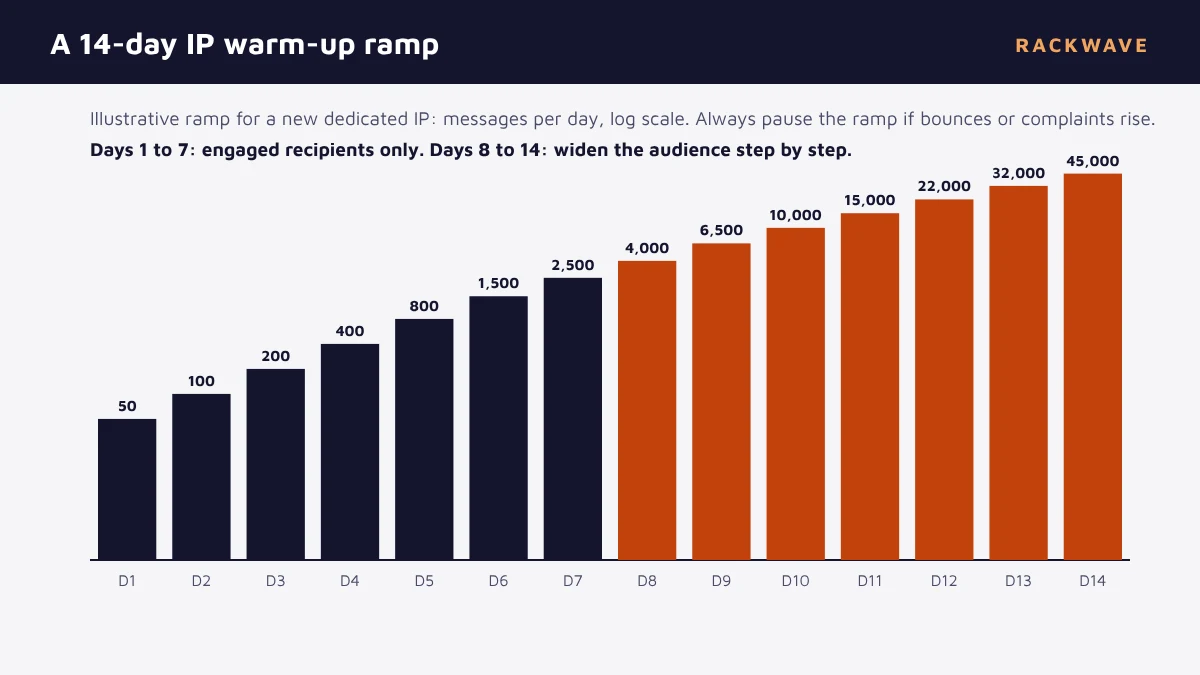
| Days | Daily volume | Audience to send to |
|---|---|---|
| 1 to 3 | 50 to 200 | Most engaged: opened or clicked in the last 30 days |
| 4 to 7 | 400 to 2,500 | Engaged in the last 60 to 90 days |
| 8 to 11 | 4,000 to 15,000 | Add recent signups and customers |
| 12 to 14 | 22,000 to 45,000 | Broaden gradually; keep excluding long-inactive contacts |
Spread each day's volume across providers in proportion to your list, and send in several smaller batches rather than one burst. If a provider starts deferring mail, hold your volume where it is until deferrals clear, then continue.
- Send to your best contacts first. Engaged recipients open, click and reply, which are the signals that build a positive history.
- Double volume only when metrics are clean. Move up if hard bounces are under 2%, complaints are under 0.1% and deferrals are minimal.
- Hold or step back on trouble. If complaints or blocks appear, return to the last volume that performed well and wait 24 to 48 hours.
- Keep sending patterns steady. Send on consistent days and times. Big gaps and sudden spikes both look unnatural.
- Move to full volume. When you reach your target, keep monitoring weekly. Reputation is maintained, not finished.
What to measure during warm-up
| Metric | Healthy range (rule of thumb) | Action if outside |
|---|---|---|
| Hard bounce rate | Below 2% | Clean the list; see the email bounce guide |
| Spam complaint rate | Below 0.1% | Pause; tighten audience and review sign-up consent |
| Deferral rate (4xx) | Low and falling | Slow the ramp for that provider |
| Open and click rate | Stable or rising | Send to a more engaged segment |
| Postmaster domain and IP reputation | High or medium-high | Hold volume until it recovers |
Warm-up is a conversation with mailbox providers. Send a little, listen to the response, then send a little more.
Automated email warm-up tools: do they work?
A separate meaning of the term has grown around cold outreach. Warm-up tools connect a mailbox to a network of other mailboxes that send, open and reply to each other's messages. The aim is to create positive engagement signals.
The approach is contested. Mailbox providers say they judge reputation from real recipient behaviour, and artificial interaction patterns can be detected. Mixed evidence and rising provider scrutiny mean you should treat such tools as a supplement at most. Genuine warm-up, sending real mail to people who want it, remains the reliable method, particularly for a dedicated IP carrying marketing or transactional volume.
Cold outreach carries extra risk. Unsolicited mail attracts complaints, and complaints cost reputation faster than any warm-up can build it. Whatever you send, honour opt-outs, identify yourself and respect the laws that apply to your recipients.
Warming a new domain or subdomain
A new sending domain follows the same logic with a lower ceiling. Start with a few dozen messages a day to people who know you, increase week by week and avoid using the main brand domain for risky experiments. For many programmes the cleanest design is a dedicated subdomain for marketing, such as mail.example.com, so any reputation problem stays contained.
Warming up when you switch platforms
Migrating from one email platform to another resets IP history even when the domain stays the same. Plan the cutover in phases, moving the most engaged segment first. Our platform migration guides, for example Mailchimp to Klaviyo and Mailchimp to Brevo, cover sequencing in more detail.
Shared IP or dedicated IP?
On a shared IP, your mail rides on the reputation of the pool, so little or no warm-up is needed, but you inherit the behaviour of other senders. A dedicated IP gives you full control of your reputation and is worth it at higher volumes, but it must be warmed. If your volume is low or irregular, a well-managed shared pool is often the better choice. When you need a dedicated IP, the MigoSMTP team can plan the ramp with you.
Warm-up mistakes to avoid
- Sending to the whole list on day one. This is the single most common cause of early blocks.
- Using stale data. Old addresses bounce and some become spam traps, which hurts a new IP the most.
- Changing too many things at once. Switching platform, domain, template and audience together makes problems impossible to diagnose.
- Ignoring one provider. Gmail may look fine while Microsoft defers your mail. Monitor each major mailbox provider on its own.
- Stopping monitoring after the ramp. Reputation moves with your behaviour, so keep watching complaint and bounce rates.
Keeping reputation after warm-up
Once you are at full volume, consistency protects what you have built. Send at a regular cadence, keep content relevant, honour unsubscribes quickly and remove inactive contacts before they become a liability. If a campaign performs badly, reduce volume to your most engaged segment and rebuild rather than pushing on.
If you do take a reputation hit, treat recovery like a fresh warm-up: pause broad sends, fix the root cause, then return to small, engaged segments and scale back up in steps.
Launching a new IP or domain?
We design warm-up plans around your list, providers and volume targets, and monitor reputation as you ramp.
Read next: Email Bounce: Hard vs Soft Bounces, Codes and Fixes · What Is DMARC? Policies, Reports and a Safe Rollout Plan · SPF Record: Syntax, Examples and How to Fix Common Errors
Frequently asked questions
What is email warm-up?
Email warm-up is the gradual increase of sending volume from a new IP address or domain so that mailbox providers can learn your sending pattern and build trust. It protects inbox placement while your reputation is still unknown.
How long does email warm-up take?
Most programmes take two to six weeks to reach full volume. A small sender may be ready in two weeks, while a sender targeting hundreds of thousands of messages a day may need a longer, provider-by-provider plan.
How many emails should I send on day one?
Start small, often 50 to 200 messages to your most engaged contacts, then increase steadily while bounces and complaints stay low. Adjust the figures to your eventual volume.
Do I need to warm up a shared IP?
Usually not, because a shared IP already carries the pool's reputation. You still need good authentication and list quality, because your own behaviour can affect the pool and your results.
Do automated email warm-up tools work?
Results are mixed. These tools simulate opens and replies between mailboxes, but providers rely on real recipient behaviour and may detect artificial patterns. Sending real mail to engaged recipients is the more dependable approach.
What happens if I do not warm up a new IP?
Sending a large volume from a cold IP often causes deferrals, spam-folder placement or blocking. Repairing a damaged reputation takes longer than a careful warm-up would have.
What are good bounce and complaint rates during warm-up?
As a rule of thumb, keep hard bounces under 2% and spam complaints under 0.1%. Google advises senders to stay below 0.1% and never reach 0.3% spam rate.
Can I warm up a domain and an IP at the same time?
Yes, and a new IP with a new domain is common. Use a lower starting volume and a slower ramp because providers have no history on either, and monitor each major provider separately.